
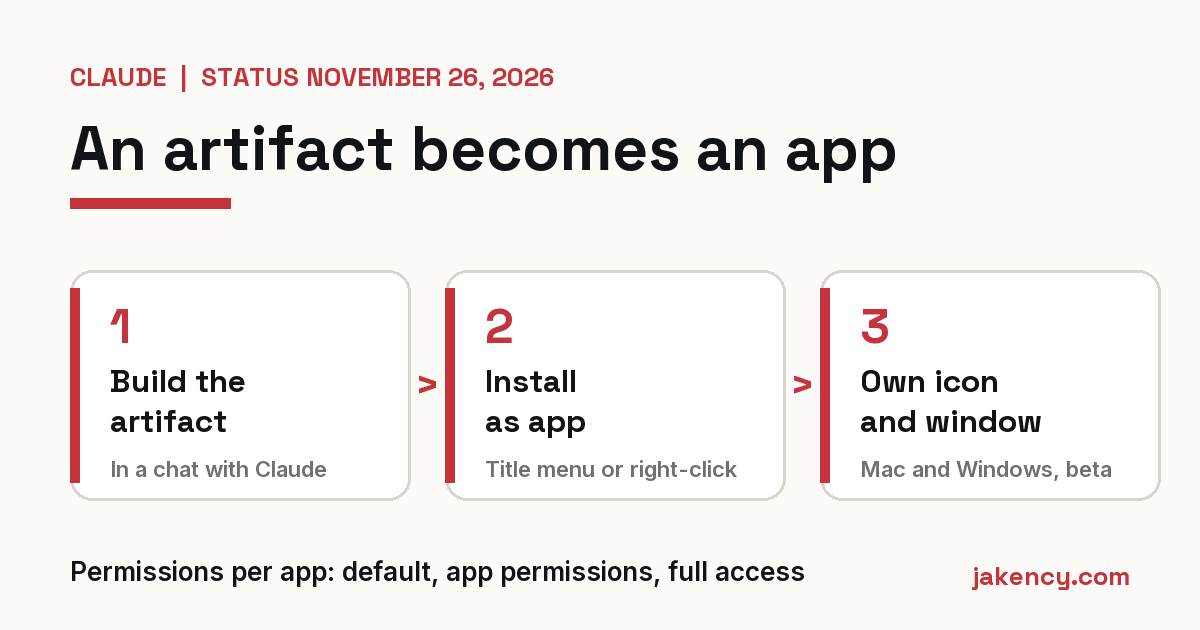
What is Install as app in Claude?
Install as app is a beta feature in Claude that turns an artifact into a standalone app on your computer. An artifact is anything Claude builds for you in a chat that you then use, such as a tool, a dashboard or a tracker. Until now an artifact stayed inside Claude, in a chat or a browser tab. The app now gets its own icon and its own window, like any other program.
| Part | What it does |
|---|---|
| Own icon and window | The app opens outside Claude, and sits in the Dock on a Mac or in the Start menu on Windows. |
| Claude and connectors | The app uses your Claude account and your connected services, with no API key and no separate login. |
| Automatic updates | Edit the artifact in Claude and the installed app updates itself. |
| Notifications and menu bar | With your permission the app sends notifications and sits in the menu bar (Mac) or system tray (Windows). |
| No packaging | You do not have to package or code-sign the app yourself. |
For more on what Claude can do, read Claude Duet and the guide to Claude Code.
How to install an artifact as an app
You install an artifact as an app in Claude Desktop in five steps. The button is called Install as app, and it sits in the artifact’s title menu or in the right-click menu. The feature only works in the Claude desktop app for Mac or Windows, not in the web version.
- Update Claude Desktop to the latest version, because the feature is rolling out in phases.
- Ask Claude to build an artifact. Describe what the tool should do and how it should look, and have mistakes fixed.
- Test the artifact in the chat and adjust it until it does what you want.
- Open the artifact’s title menu or right-click it, and choose Install as app.
- Confirm with Install. The app appears in its own window.
| System | Where to find the app |
|---|---|
| Mac | In the Claude Apps folder inside your Applications folder, through Spotlight or in the Dock |
| Windows | In the Start menu under Claude Apps or through a desktop shortcut |
You remove an app through the File menu, then Apps. The artifact itself stays when you remove the app.
What you need and who gets it
Install as app works on Mac and Windows, in beta on every Claude plan. Each app only opens while you are online and signed in to Claude. For teams and companies, the admin decides what is allowed.
| What | Status on November 26, 2026 |
|---|---|
| Platforms | Mac and Windows, through Claude Desktop |
| Plans | Beta on all plans, including free |
| Team | On by default, with full computer access off |
| Enterprise | Off until an owner turns the feature on |
| Admins | Turn app permissions and full access on or off per organization |
| Excluded environments | HIPAA-ready organizations and hybrid deployments |
| Connection | Online and signed in to Claude to open an app |
| Cannot be installed | Claude Docs, Claude Slides and Claude Sheets |
| Usage | Requests the app makes to Claude count toward your plan’s limits |
Data an artifact stores gets room for up to 100 MB and 25,000 documents by default. Personal storage is visible only to you, shared storage also to others who use the artifact.
Which permissions an app can get
An installed app gets permissions at three levels, and every level needs your approval. The app starts with the rights of a web page in a browser. Full computer access is the top level, and only apps you made yourself qualify for it.
| Level | What the app can do | Who can grant it |
|---|---|---|
| Default | Do what a web page in a browser does | Everyone |
| App permissions | Send notifications, use global keyboard shortcuts, stay on top of other windows, show a menu bar or tray icon | You, per app |
| Full computer access | Run programs and read, change or delete files without asking each time | Only for apps you made yourself. On Team and Enterprise also for apps by colleagues in your organization |
Anthropic does not review apps before you install them. A permission covers one version of the app, and Claude asks again after every update, including your own edits. If part of the app loads from another website, that part can change without a new prompt. You change permissions later through the File menu, then Apps, then Permissions.
Which apps you can build
Anthropic itself shows apps such as an image editor with layers, a file manager that organizes folders with AI and a system monitor in the menu bar. User demos also include a clipboard history, a to-do app, a focus mode that closes distracting programs and an inbox for scanned mail. The scan inbox summarizes a letter, names the action and the amount, and puts the task in a task list through a connector.
For a small business, small internal tools are the obvious fit. A quote calculator, an overview of open requests or a content planner are examples of what such an app could be. They are ideas. Whether an app works for your task, you only learn from a test with real data.
What it means for a small business
For a small business, Install as app means a small tool for one task can exist in an afternoon. The common view is that custom software takes a developer and a budget. For a small internal tool that no longer holds. A system with logins, roles and its own back end still needs real development, and an artifact does not replace a CRM or accounting package for now.
Four points deserve attention in a business. First, the data you enter in an app goes through your Claude account, so customer data needs a check against your privacy policy. Second, an app only works online and signed in, and the artifact lives with Anthropic, so keep the source data yourself as well. Third, usage counts toward your limits, and that can add up quickly for an app that calls Claude often. Fourth, on Team and Enterprise an admin can limit or switch off the feature, so talk to your IT admin before you start.
How to use an app safely
You use an app safely by giving it only the permissions the task needs. An app with full computer access can change and delete files, including through a mistake in the code Claude wrote. Five habits limit the risk.
- Start with the default permissions, and grant a permission only when the app demonstrably needs it.
- Test an app that changes files on copies first, never on your only version.
- Give full computer access only to an app you made yourself and understand.
- Read the permission prompt again after every update, including your own edits.
- Keep an app from loading parts from another website unless it has to.
Common misconceptions about Claude apps
Statements about Install as app circulate that do not hold. The table sets the common claims next to what Anthropic states.
| Myth | What is true |
|---|---|
| An installed app works without Claude, even offline. | An app only opens when you are online and signed in to Claude. |
| Any artifact can become an app. | Claude Docs, Slides and Sheets cannot be installed. |
| The feature is for paying subscribers only. | The beta runs on all plans. On Enterprise it stays off until an owner turns it on, and HIPAA-ready organizations and hybrid deployments are excluded. |
| Any app can get full access to your computer. | Only an app you made yourself, and on Team and Enterprise an app from your organization. |
| A permission you granted stays valid forever. | A permission covers one version. Claude asks again after every update. |
| Anthropic reviews the apps for safety first. | Anthropic does not review apps before you install them. |
| Using an app is free. | Requests the app makes to Claude count toward your plan’s limits. |
What else should you know about Claude apps?
Does installing an artifact as an app cost extra?
Anthropic lists no separate price. The app runs on your Claude account, and every request the app makes to Claude counts toward your plan’s usage limits. Building the artifact counts too.
Does an installed Claude app work offline?
No. An app only opens when you are online and signed in to Claude, so it is not a standalone program.
Can I install any artifact as an app?
No. Claude Docs, Claude Slides and Claude Sheets cannot be installed. An ordinary artifact, such as a tool, a dashboard or a tracker, can.
Which permissions does a Claude app ask for?
An app starts with the rights of a web page in a browser. After that it can ask for notifications, keyboard shortcuts, a menu bar icon or to stay on top of other windows. Full computer access, which lets it run programs and change files, goes only to an app you made yourself or, on Team and Enterprise, one made by someone in your organization.
What happens to my permission after an update?
A permission covers one version of the app. Claude asks again after every update, including your own edits. Parts of the app that load from another website can change without a new prompt.
Can I install the app on my phone or on Linux?
Anthropic names only Mac and Windows. Other platforms are not in the announcement.