
Published on
What are WordPress SEO services?
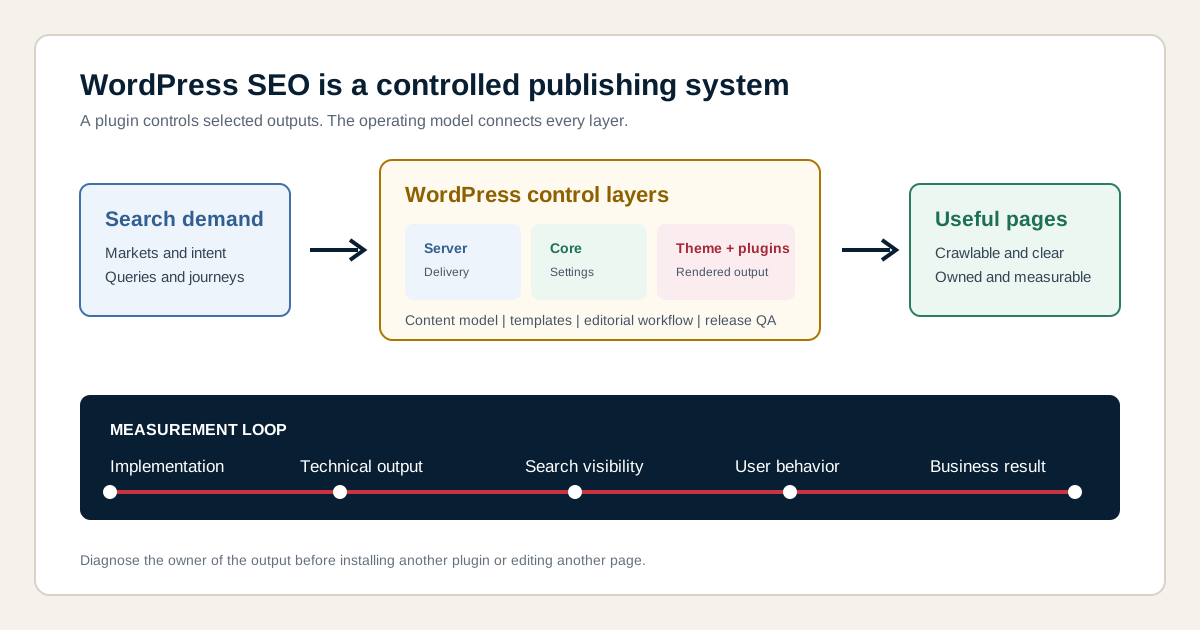
WordPress SEO services improve the organic search performance of websites built with the WordPress content management system. The work covers search strategy, crawling, indexation, templates, content, internal links, structured data, performance, authority, editorial governance and measurement. It also identifies where each change must be implemented inside the specific WordPress stack.
The platform matters because the visible page can be controlled by several systems at once. WordPress core may create the URL, a theme may render the heading, a page builder may create the layout, an SEO plugin may output the canonical, a caching plugin may change delivery and an editor may publish the content. Effective SEO services connect those layers instead of treating every problem as a content edit.
Is WordPress good for SEO?
WordPress can be a strong SEO platform when its flexibility is governed deliberately. It supports editable content, posts, pages, categories, tags, media, users, permalinks and extensions. Those capabilities make many search tasks practical, but they also create choices that can generate duplicate archives, unstable layouts, excessive scripts or conflicting metadata.
WordPress itself is not a ranking advantage. Google evaluates the pages it can access and the usefulness of their content, not the popularity of the content management system. A clean installation with weak content will not outperform a useful competitor automatically. A heavily customized installation can perform well when its output remains crawlable, coherent, fast enough and aligned with user intent.
When does a website need a WordPress SEO specialist?
A website needs a WordPress SEO specialist when organic problems depend on platform behavior, template logic or implementation ownership rather than one isolated page. The specialist should understand both search requirements and the controls available in WordPress, while knowing when a developer, host, editor or plugin vendor must become involved.
- Important pages receive impressions but titles, headings or intent remain inconsistent.
- Category, tag, author, date, attachment or search archives create low-value URL patterns.
- A theme or page builder hides important links or content behind complex rendering.
- Multiple plugins output canonicals, schema, sitemaps or social metadata.
- Core Web Vitals vary between templates and cannot be solved with one cache setting.
- A redesign or migration risks changing URLs, metadata, internal links or structured data.
- Editors can publish pages, but no page ownership or internal linking workflow exists.
- Reporting shows traffic without qualified leads, revenue or release context.
How is WordPress SEO different from general SEO?
WordPress SEO applies general search principles to a modular publishing platform where a small configuration or template change can affect many URLs. The SEO question remains what users need and which page should satisfy that need. The implementation question becomes which WordPress layer controls the result and how a release can be tested without breaking another template.
| General SEO decision | WordPress implementation question | Typical owner |
|---|---|---|
| Choose the canonical page | Which plugin, theme or custom function outputs the canonical? | SEO consultant and developer |
| Improve a page template | Is the layout controlled by blocks, theme files, fields or a page builder? | Designer, editor and developer |
| Control indexation | Which archives and custom post types exist, and who can change their settings? | SEO consultant and administrator |
| Improve performance | Do hosting, theme, plugins, media or third-party scripts cause the delay? | Developer, host and site owner |
| Publish a content cluster | Which post types, taxonomies, fields and reusable patterns support it? | SEO lead and editorial team |
What should WordPress SEO services include?
WordPress SEO services should include diagnosis, decision-making, implementation guidance, validation and measurement across the workstreams that matter for the site. A fixed plugin package cannot cover every theme, hosting environment, custom post type, market or editorial process.
| Workstream | Work performed | Useful output |
|---|---|---|
| Baseline | Review Search Console, analytics, crawling, conversions and release history | Evidence summary and prioritized issue model |
| Platform inventory | Map hosting, WordPress core, theme, builder, plugins, post types and taxonomies | Control and ownership map |
| Technical SEO | Review rendering, status codes, canonicals, directives, sitemaps and performance | Development requirements and acceptance criteria |
| Architecture | Map demand to pages, posts, categories, hubs and supporting content | Page ownership and internal linking plan |
| Template optimization | Improve reusable titles, headings, fields, links, media and schema | Template specification and test URLs |
| Editorial governance | Define briefs, metadata, links, review, updates and archive decisions | Publishing checklist and responsibilities |
| Release QA | Compare staging and production output before and after changes | Validation log, evidence and rollback decision |
| Measurement | Connect landing pages with search signals and business outcomes | Dashboard definitions and review rhythm |
Which WordPress layer owns an SEO problem?
The owner of a WordPress SEO problem is the layer that produces or controls the affected output. Diagnosing ownership before changing settings prevents teams from installing another plugin for a problem caused by a theme, content model, server or editorial rule.
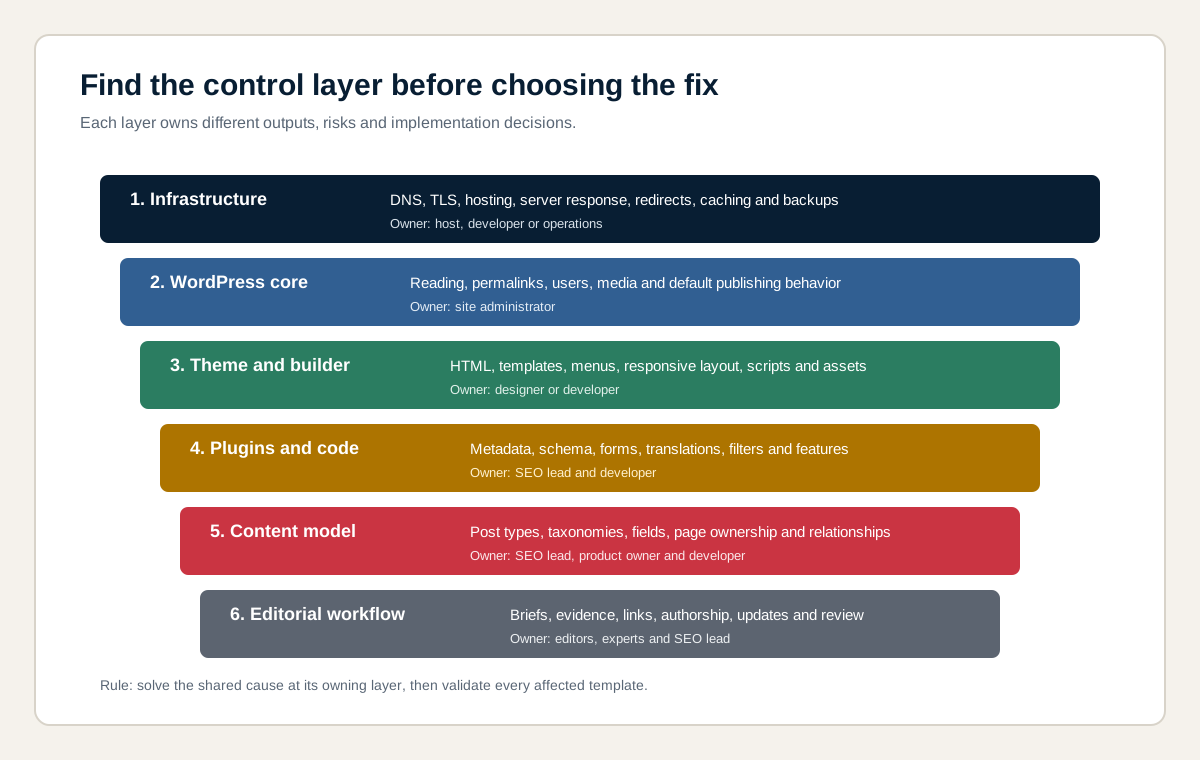
| Control layer | Examples | Common mistake |
|---|---|---|
| Infrastructure | DNS, TLS, server response, caching, redirects and backups | Trying to solve server latency only inside an SEO plugin |
| WordPress core | Reading settings, permalinks, users, media and default content behavior | Ignoring a sitewide setting while editing individual pages |
| Theme and builder | HTML structure, responsive layout, menus, blocks, scripts and templates | Blaming content for markup or rendering generated by the theme |
| Plugins and custom code | Metadata, schema, forms, translations, filters and functionality | Running overlapping features without one source of truth |
| Content model | Post types, taxonomies, fields, URL ownership and relationships | Publishing every database entity as an indexable page |
| Editorial workflow | Briefs, authorship, internal links, updates, review and deletion | Assuming a good template guarantees useful content |
How does a WordPress SEO audit work?
A WordPress SEO audit compares search evidence with the rendered website, WordPress configuration and content workflow. It should identify patterns, affected templates and business impact rather than export every crawler warning as an equal priority.
- Define the goal: identify markets, conversions, priority services, products or audiences.
- Build the baseline: record queries, landing pages, indexation, conversions and known releases.
- Inventory the stack: document hosting, core version, theme, builder, plugins, custom code, post types and taxonomies.
- Crawl and render: compare status codes, directives, canonicals, links, content and assets across templates.
- Inspect configuration: verify reading, permalink, archive, sitemap, metadata and plugin behavior.
- Sample templates: test representative pages, posts, archives, custom types, translations and error states.
- Prioritize causes: group symptoms under the shared control that can resolve them at scale.
- Define acceptance: specify expected output, owner, test URL, evidence and rollback condition.
A technical SEO audit provides the broader diagnostic method. WordPress specialization adds configuration access, template ownership, plugin conflicts and a release model for this CMS.
Which WordPress visibility setting can block indexing?
The Reading setting that asks search engines not to index the site can contribute to an unintended visibility problem when it remains enabled after development. It is a request to search engines, not password protection, and the actual output should be checked on representative URLs after launch.
Staging environments should be protected deliberately, preferably with access control rather than relying only on a public robots directive. Before production launch, check the setting, rendered robots meta tags, HTTP headers, robots.txt, canonical URLs and Search Console inspection. A green checkbox in the dashboard is not proof that every public template is eligible for indexing.
How should WordPress permalinks be configured?
WordPress permalinks should produce stable, descriptive URLs that remain practical as the site grows. The best structure depends on page ownership and migration constraints. A short post-name pattern often works well, but changing an established structure can create redirect work, broken links and reporting discontinuity.
Do not add dates, categories or folders only because a plugin recommends them. Decide whether those elements express durable information architecture. When URLs change, map every valuable old URL to the most relevant new destination, update internal links and sitemaps, preserve campaign tracking where needed and validate redirects. The guide to SEO-friendly URLs explains the general rules in more detail.
How should categories, tags and archives be handled?
Categories, tags and archives should be indexable only when they provide a distinct, useful destination with stable ownership and sufficient content or listings. WordPress can generate category, tag, author, date, format, attachment, search and custom taxonomy archives. Not every generated archive deserves organic visibility.
| Archive type | Keep indexable when | Consolidate or exclude when |
|---|---|---|
| Category | It represents a durable topic, useful collection and internal navigation hub | It duplicates another category or contains a weak, changing selection |
| Tag | Editors use a controlled taxonomy that answers a distinct browsing need | Tags are created freely and produce many one-item or overlapping archives |
| Author | Authorship matters and the profile supports expertise and discovery | A single author archive duplicates the main blog without added value |
| Date | Time-based discovery is genuinely useful to the audience | Month and year archives duplicate the same posts without a separate task |
| Attachment | The media page has independent purpose and useful context | Thin attachment URLs expose an image without a meaningful page |
| Custom taxonomy | The relationship supports a real searchable or navigational entity | The taxonomy exists only for database administration |
What should an SEO plugin control?
An SEO plugin should provide a reliable interface for the controls it actually owns, such as title templates, meta descriptions, canonical elements, robots directives, XML sitemaps and supported structured data. One designated plugin should own each output where possible.
Yoast SEO, Rank Math, All in One SEO and other plugins differ in interface and features. The choice should follow requirements, compatibility, maintenance and team usability rather than a belief that one plugin earns better rankings. Avoid enabling automatic schema, redirects or archive rules without checking visible content and the existing stack. The English comparison of WordPress SEO plugins will remain a separate blog intent, while this page owns the commercial service scope.
Can an SEO plugin fix WordPress SEO automatically?
An SEO plugin cannot fix WordPress SEO automatically because it does not decide the business goal, search intent, page ownership, usefulness, expertise, site architecture or implementation priority. A plugin can expose controls and flag patterns, but a green score is not evidence that a page satisfies its audience or deserves visibility.
Plugin recommendations can be useful prompts for editors. They become harmful when writers repeat keywords unnaturally, add links without context or rewrite a clear title only to satisfy a generic score. Treat every recommendation as a question. Accept it when it improves the page for the intended user and reject it when the page already communicates the topic more accurately.
How should WordPress canonical URLs be managed?
WordPress canonical URLs should identify the preferred version of duplicate or very similar pages and remain consistent with redirects, internal links and XML sitemaps. The canonical is a signal, not a command, so contradictory signals make the intended owner less clear.
Test canonicals on posts, pages, archives, paginated states, filtered views, translations, campaign URLs and custom post types. Confirm the rendered HTML contains one intended canonical and that JavaScript or another plugin does not replace it. Google recommends linking internally to the canonical URL and using consistent canonical signals. A canonical should not be used to hide unrelated duplicate content or compensate for uncontrolled URL generation.
How should XML sitemaps work in WordPress?
WordPress XML sitemaps should list canonical URLs that the site wants search engines to discover and consider for indexing. They help discovery and monitoring, but they do not replace crawlable internal links or guarantee indexation.
WordPress core and SEO plugins can generate sitemaps, so verify which system owns the output. Remove unintended duplicates, excluded archives, redirecting URLs, error pages and non-canonical variants. Large sites may split sitemaps by post type or purpose. Submit the intended sitemap index in Google Search Console and investigate patterns where submitted URLs remain excluded, rather than treating a successful submission as proof that the pages are useful or indexed.
How should WordPress content architecture be designed?
WordPress content architecture should map each important search intent and customer task to one primary page owner. Post types and taxonomies should support that model rather than determine it. The database can store a relationship without publishing a separate indexable URL for every value.
Service businesses may need service, sector, location, case and knowledge structures. Publishers may need topics, authors and evergreen guides. Membership or directory websites may require custom post types and relationship fields. In every model, decide which page is primary, which pages support it and how users move between them. The broader SEO strategy sets business and market priorities before the WordPress implementation is designed.
How should WordPress templates support organic growth?
WordPress templates should make required SEO and user elements available consistently without forcing every page into identical copy. A good template provides stable structure, editable fields, semantic HTML, sensible fallbacks and clear rules for optional sections.
| Template element | System responsibility | Editorial responsibility |
|---|---|---|
| Title and heading | Expose one reliable title and H1 field with fallbacks | Describe the specific page and intent accurately |
| Main content | Render crawlable HTML in logical source order | Answer the user task with evidence and useful detail |
| Images | Generate responsive sizes and stable dimensions | Use relevant files, captions and alternative text |
| Internal links | Provide menus, breadcrumbs and relationship components | Select contextual destinations and descriptive anchors |
| Structured data | Output valid types from controlled fields | Keep visible facts accurate and complete |
| Conversion | Provide accessible form and call-to-action components | Match the action to the page and customer stage |
How should internal linking work in WordPress?
Internal linking in WordPress should connect important pages through crawlable navigation, breadcrumbs, contextual links and purposeful related-content components. Every priority page needs at least one discoverable path from another page, while anchor text should describe the destination naturally.
Automatic related-post plugins can create scale, but their relevance, HTML output and performance need review. Manual contextual links often express meaning more precisely. Use hubs for major topics, link supporting articles back to their primary commercial or informational owner and repair orphan pages. Avoid repeating the same exact-match anchor sitewide. The internal linking guide provides the complete audit and implementation method.
How do themes and page builders affect SEO?
Themes and page builders affect SEO by controlling HTML structure, responsive behavior, navigation, asset loading, visual stability, content order and reusable templates. They can support excellent pages or introduce duplicate headings, inaccessible components, excessive wrappers and scripts.
Elementor, Divi, WPBakery, Gutenberg blocks and custom themes require different diagnostics. Do not select or reject a builder based only on generic reputation. Test the actual output across representative pages and devices. Check whether key content appears in rendered HTML, links use valid anchors, headings reflect the hierarchy, images have stable dimensions and essential features work without layout overlap. Replacing a builder is a migration decision, not an automatic SEO recommendation.
How can WordPress Core Web Vitals be improved?
WordPress Core Web Vitals improve when the actual cause of slow loading, delayed interaction or layout movement is removed. The cause may sit in server response, theme code, images, fonts, consent tools, advertisements, third-party scripts, plugins, page builders or content components.
Start with field data where available and use lab tests to reproduce individual issues. Then diagnose by template, device and component. Image compression, responsive delivery, caching, script control and font optimization can help, but combining performance plugins without understanding their behavior can create conflicts. Validate both speed and functionality after every change. The Core Web Vitals service page explains metrics and implementation in depth.
How should images be optimized in WordPress?
WordPress images should use descriptive filenames, appropriate formats, responsive dimensions, stable width and height, useful alternative text and nearby context. The goal is to communicate the image and serve the right asset efficiently, not to insert keywords into every field.
Audit original uploads, generated sizes, compression, lazy loading, featured-image crops and image sitemap behavior where relevant. Avoid uploading a very large source when the design never displays it at that size. Do not add alternative text to decorative images that should be ignored by assistive technology. For informative diagrams, write alternative text that describes the decision or relationship shown, and keep the surrounding explanation available as HTML.
How should structured data be implemented in WordPress?
Structured data in WordPress should describe visible, accurate content with supported Schema.org types and one consistent entity model. It can be generated by an SEO plugin, a specialized schema plugin, theme code or custom fields. The implementation must avoid duplicate or contradictory nodes.
Map the organization, website, people, services, articles, products, breadcrumbs and other eligible entities deliberately. Reuse stable identifiers and connect authors to real profile pages. Validate syntax and eligibility, but do not promise rich results. Google does not guarantee a special search appearance even when markup is valid. The structured data service covers schema design and testing.
How should staging and WordPress migrations be handled?
Staging and WordPress migrations should protect private environments while preserving valuable production URLs, content, metadata, links, media and measurement during release. A migration is an SEO project whenever domain, protocol, URL structure, theme, builder, taxonomy, content model or rendering changes.
Create a URL inventory and redirect map before launch. Compare representative templates on staging, but prevent public indexing through proper access control. At release, verify redirects, canonicals, robots directives, sitemaps, analytics, forms, structured data and internal links. Keep backups and a rollback path. After launch, monitor crawl errors, selected canonicals, indexation, queries, landing pages and conversions. The website migration service provides the full process.
How should plugin and theme updates be released?
Plugin and theme updates should follow a controlled release process when they can change public HTML, assets, redirects, metadata, schema, forms or tracking. Updating production without a representative test may solve a security or compatibility issue while silently changing search output.
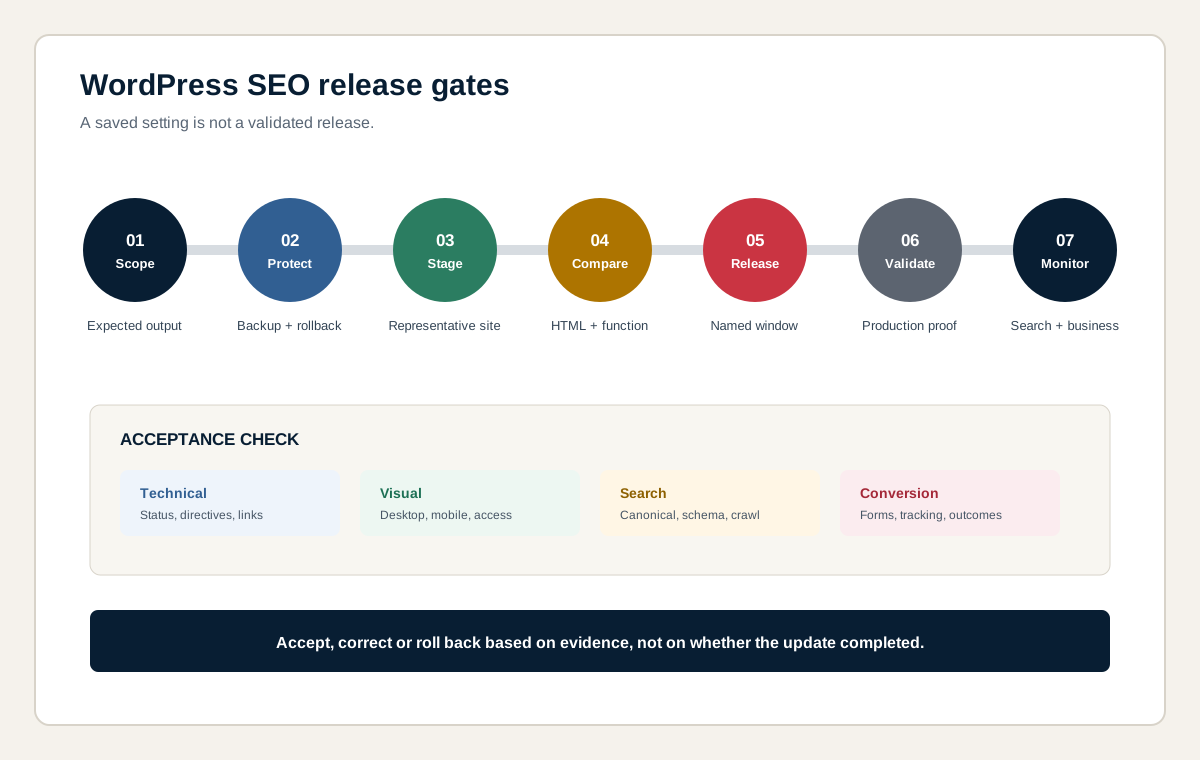
- Scope: record the update, affected components and expected output.
- Protect: create a tested backup and define the rollback trigger.
- Stage: apply the change in a representative environment where possible.
- Compare: inspect HTML, metadata, links, schema, performance and forms on sample templates.
- Release: deploy within an agreed window with responsible owners available.
- Validate: repeat critical checks on production and record evidence.
- Monitor: watch errors, search performance and conversions for unexpected changes.
How should WordPress security and availability relate to SEO?
WordPress security and availability support SEO by keeping intended pages accessible, trustworthy and under the site owner's control. Security is not a simple content score or universal ranking claim. The practical risk is that compromised, injected, redirected or unavailable pages can damage users, indexing and business performance.
Maintain supported software, restricted access, backups, monitoring and an incident process. Remove unused plugins and accounts, protect administrative routes and verify changes after recovery. Search Console security notifications, server logs and uptime monitoring can contribute evidence. Specialist security work may require the host or a security professional and is not automatically included in an SEO engagement.
How does WordPress SEO work for multilingual websites?
Multilingual WordPress SEO requires separate, localized pages with stable URLs, accurate language relationships and market-specific search intent. Translation plugins such as WPML, Polylang or custom multilingual systems affect URLs, canonicals, sitemaps, menus and editorial workflows.
Choose subdirectories, subdomains or domains based on business and operational needs, then implement consistent hreflang and self-referencing canonicals. Do not translate keywords literally when customers use different terminology or expect a different offer. Test language switchers as crawlable links and avoid automatically redirecting every visitor by location. The multilingual SEO service covers localization, governance and market measurement.
How does WordPress SEO work for international markets?
International WordPress SEO coordinates market selection, localized demand, website architecture, content, links and measurement across countries. A single English version may serve several markets, but local competition, terminology, trust, currency, legal context and conversion expectations can differ.
Jakency can support organizations in Belgium, the Netherlands, the United States, the United Kingdom and other markets. Each market receives its own assumptions and performance view. The international SEO service determines which markets deserve a dedicated version and how WordPress should support the rollout without creating unmanaged duplicates.
How does WordPress SEO work for WooCommerce?
WooCommerce SEO adds categories, products, attributes, variants, filters, prices, stock and checkout behavior to the WordPress control model. The store must decide which catalog URLs deserve discovery and how product data, visible content, structured data and feeds remain consistent.
Technical risks can include faceted URL growth, duplicate variants, thin category pages, unavailable products, slow templates and plugin conflicts. Commercial measurement should connect organic landing pages with product views, carts, transactions, revenue and margin where available. The dedicated ecommerce SEO service owns the full catalog and revenue intent, while this page explains the WordPress platform layer.
How does WordPress support local SEO?
WordPress supports local SEO by publishing accurate location, service, contact, evidence and reputation content through a coherent site structure. The website should match the real business model and complement the Google Business Profile rather than generate thin city pages for every place name.
Use reusable location templates only when each page represents a genuine service area or location and can provide distinct information. Keep organization details consistent, connect relevant projects and reviews, add appropriate structured data and measure local queries and leads. The international local SEO page explains multi-location, service-area and market differences.
Can WordPress pages support AI search visibility?
WordPress pages can support AI search visibility when they are public, technically accessible, clear about entities and relationships, current, attributable and useful as sources. WordPress does not need a universal AI plugin or invented AI schema to achieve this.
Strong source pages use explicit names, services, locations, authors, claims and evidence. Structured data can reinforce consistency, but it does not guarantee selection or citation. External systems such as ChatGPT and Perplexity require separate crawler and visibility checks, while Google generative search remains connected to Google Search eligibility and measurement. Jakency's GEO services handle source architecture and AI visibility measurement beyond conventional SEO.
How should WordPress SEO performance be measured?
WordPress SEO performance should be measured across implementation, technical output, search visibility, user behavior and business outcomes. The reporting model should distinguish a completed change from a later search or commercial effect.
| Measurement layer | Examples | Decision supported |
|---|---|---|
| Implementation | Settings changed, templates released, links added and tests passed | Was the agreed work delivered? |
| Technical output | Status codes, canonicals, directives, schema, rendering and performance | Does production behave as specified? |
| Google Search | Queries, impressions, clicks, CTR, positions and indexation patterns | Is relevant search visibility changing? |
| User behavior | Landing-page engagement, navigation, forms and task completion | Does the page help visitors move forward? |
| Business outcome | Qualified leads, pipeline, transactions, revenue or margin | Does organic search contribute to the goal? |
| Operational quality | Publishing errors, update time, regression rate and unresolved dependencies | Can the system sustain improvement? |
Use Google Search Console, analytics, form or commerce data and a release log with stable definitions. Note migrations, campaigns, seasonality, measurement changes and major content releases. A performance change after a release is an observation that needs context, not automatic proof of causation.
Which WordPress symptom should be fixed first?
The first WordPress SEO fix should address the shared cause with the greatest supported business impact, not the issue with the highest count in a tool. One faulty template may deserve priority over hundreds of minor page warnings.
| Observed symptom | Investigate first | Avoid assuming |
|---|---|---|
| Important pages are excluded | Reading settings, robots directives, canonicals, status and internal links | More content will solve an eligibility problem |
| Many duplicate archives | Taxonomy purpose, plugin settings, canonical consistency and navigation | Every generated archive deserves indexation |
| Mobile pages are slow | Template, server, media, scripts, consent and field data | Installing another cache plugin is sufficient |
| Impressions rise but leads do not | Query intent, landing page, offer, form and measurement | Traffic volume is the final business result |
| Metadata changes unexpectedly | Theme, SEO plugin, custom fields, translation and cache ownership | The editor is the only source of output |
| A redesign lost visibility | Redirects, content parity, canonicals, internal links, rendering and tracking | The new visual design preserved search signals automatically |
What does the WordPress SEO process look like?
The WordPress SEO process moves from evidence to implementation through controlled phases. The exact sequence changes with risk, existing traction and internal capacity.
- Scope: define business outcomes, markets, audiences, priority templates and access.
- Baseline: document search performance, indexation, conversions, technical conditions and releases.
- Control map: identify the system and owner behind settings, templates, plugins, content and infrastructure.
- Priorities: rank shared causes by impact, evidence, scale, dependency and effort.
- Specification: write expected output, examples, acceptance criteria and rollback conditions.
- Implementation: coordinate editors, developers, hosts and plugin configuration.
- Validation: compare staging and production against technical, visual and conversion tests.
- Measurement: monitor comparable periods and use evidence to choose the next workstream.
What deliverables can Jakency provide?
Jakency can provide a focused WordPress SEO audit, implementation plan, consultancy engagement, hybrid collaboration or managed program. Deliverables are selected from the website's actual needs rather than bundled automatically.
- Management summary with objective, main risk, opportunity and recommended scope.
- Search and conversion baseline with data periods, filters and limitations.
- WordPress stack inventory covering hosting, theme, builder, plugins and custom code.
- Post type, taxonomy, archive, sitemap, canonical and indexation policy.
- Page ownership, architecture and internal linking model.
- Template and component requirements with representative test URLs.
- Plugin configuration decisions and conflict register.
- Prioritized development tickets with acceptance criteria.
- Editorial publishing and update checklist.
- Staging and production validation log.
- Measurement definitions, release annotations and review cadence.
What is not automatically included in WordPress SEO?
WordPress SEO does not automatically include unlimited development, hosting administration, emergency security response, complete website redesign, custom plugin development, legal review, accessibility certification, translation, content production or paid media. These activities can become dependencies or separately scoped work.
The proposal states which websites, markets, templates, plugins, pages, implementation tasks and review rounds are included. It also names the access and input the client must provide. Rankings, indexation, rich results, AI citations, leads and revenue cannot be guaranteed because search systems, competitors, market behavior and client execution remain external variables.
Which collaboration model fits a WordPress website?
The right collaboration model depends on internal SEO knowledge, editorial capacity, developer availability and ownership of the WordPress stack. A clear responsibility model is more important than choosing an agency label.
| Model | Best fit | Jakency role |
|---|---|---|
| Focused audit | Team needs a baseline and prioritized diagnosis | Investigate, explain causes and deliver action requirements |
| SEO consultant | Internal team or agency can implement but needs senior guidance | Set direction, write specifications and review quality |
| Hybrid implementation | Client, developer and Jakency each own selected workstreams | Coordinate shared standards and validate releases |
| Managed SEO | Organization needs recurring strategy, content and optimization | Manage priorities, delivery, reporting and iteration |
How much do WordPress SEO services cost?
WordPress SEO cost depends on the number of URLs and templates, custom code, plugin overlap, languages, WooCommerce, hosting access, technical debt, content requirements, migration risk, development ownership and reporting depth. A small service site with a standard theme requires a different scope from a publisher or multilingual platform with custom post types.
A reliable quote defines the objective, evidence, included templates, markets, deliverables, implementation owner, validation method and exclusions. The SEO pricing guide provides broader budget context. A free scan can first determine whether the main constraint is technical, editorial, architectural or commercial.
How should a WordPress SEO agency or consultant be selected?
A WordPress SEO provider should explain how it connects search intent, WordPress controls, development, content and measurement. Ask for evidence of the diagnostic method and deliverables rather than a guaranteed ranking or a package built around plugin tasks.
| Selection question | Strong answer includes | Warning sign |
|---|---|---|
| How will you diagnose the site? | Search data, crawl, rendering, configuration, templates and business goals | Only an automated score or generic checklist |
| Who implements changes? | Named responsibilities for SEO, development, hosting and content | Implementation is assumed but not scoped |
| How are plugin recommendations made? | Requirements, compatibility, ownership and maintenance | One plugin is presented as a ranking solution |
| How are releases tested? | Representative URLs, acceptance criteria, backups and production validation | Changes are accepted when the dashboard saves |
| How is success measured? | Technical output, search visibility, qualified traffic and business outcome | Ranking counts without conversion context |
| What is not included? | Explicit limits, dependencies and client inputs | Unlimited promises without ownership or capacity |
Why work with Jakency on WordPress SEO?
Jakency provides founder-led WordPress SEO with direct access to Jan Kenis, who founded Jakency in 2013 and works as an SEO, GEO and AI consultant. The approach combines organic search strategy with technical implementation, page ownership, content, conversion and release validation.
Jakency works from Belgium with organizations targeting Belgium, the Netherlands, the United States, the United Kingdom and other international markets. We can work with an existing WordPress developer, content team or agency, or own selected workstreams directly. The projects and cases describe Jakency's actual role and available evidence without promising identical outcomes for another website.
Which sources support this WordPress SEO framework?
The technical guidance was checked on August 18, 2026 against official WordPress and Google documentation. Competitive service pages were used to confirm current commercial intent and shared coverage, not as sources for ranking promises. Jakency's control layers, release gates and ownership matrices are operating frameworks, not Google ranking factors.