
Published on
What does SEO-friendly URL mean?
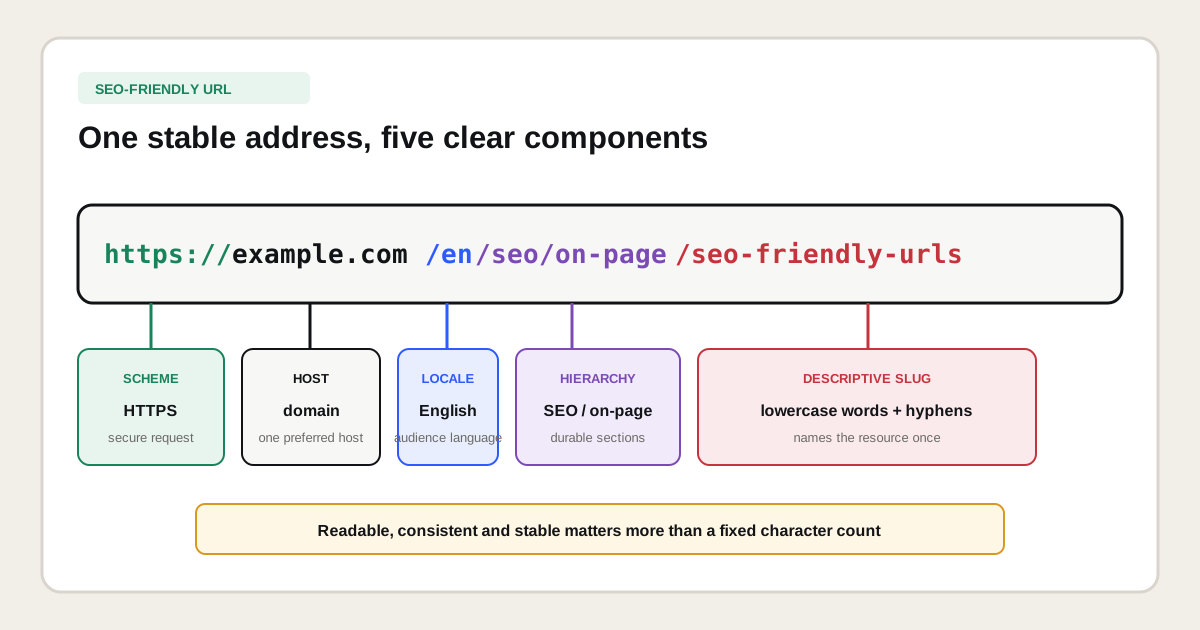
An SEO-friendly URL means that a web address can be crawled reliably, identifies one intended resource and communicates a sensible place in the site structure. People should be able to read the path without decoding long IDs, duplicated folders or tracking values.
The central entity is the resource, such as a service, category, product or guide. The URL locates that resource through a scheme, host and path. Optional query parameters can modify the requested representation, while a fragment can point to a position within the returned document. SEO work keeps those relationships stable and prevents several uncontrolled URLs from representing the same indexable content.
Which parts make up a URL?
A web URL can contain a scheme, hostname, port, path, query string and fragment. Not every public URL needs every component, but each part has a different technical function and should not be treated as one long keyword field.
| Component | Example | Function |
|---|---|---|
| Scheme | https:// | Defines the protocol used to request the resource. |
| Hostname | www.example.com | Identifies the domain or subdomain serving it. |
| Path | /en/seo/url-structure | Locates the resource within the host. |
| Query string | ?sort=recent | Passes parameters that may alter the response or view. |
| Fragment | #examples | Points to a location or state inside the document. |
A slug usually refers to the final descriptive path segment, such as seo-friendly-urls. The full path can also contain folders for language, product family or content type. A permalink is the durable public URL intended to remain stable over time. These terms overlap in everyday CMS language, but they are not exact synonyms.
What does Google recommend for URL structure?
Google recommends crawlable, simple URLs that use descriptive words, the audience's language, hyphens between words and as few unnecessary parameters as possible. Google also states that URL paths are case sensitive and that fragments should not be used to change the primary page content.
These recommendations come from the current Google Search Central URL structure documentation. The document distinguishes technical crawlability requirements from best practices that make a structure easier for people and Google to understand. It does not publish one mandatory URL length, maximum folder count or keyword formula that guarantees rankings.
What does a good SEO-friendly URL look like?
A good SEO-friendly URL looks concise, descriptive and unsurprising in the context of the website. The path names the page once, follows the established language and folder pattern, and avoids temporary campaign data.
| Page purpose | Clear example | Problematic example |
|---|---|---|
| SEO audit service | /en/seo/technical/audit | /page?id=48392&ref=nav |
| Running shoe category | /shoes/running-shoes | /shop/cat-4/subcat-22/list-8 |
| Local service | /locations/boston/seo-consulting | /best-seo-seo-services-boston-ma |
| English article | /en/blog/url-migration-checklist | /blog/2026/08/11/post-994-final-v2 |
| Product detail | /laptops/model-name | /product.php?sku=99514&session=abc |
The clear examples are patterns, not universal templates. A large catalogue may need stable product IDs, and a publication may deliberately use dates. The test is whether the structure stays unique, understandable and maintainable for that business rather than whether it copies one ideal-looking URL.
Should an SEO-friendly URL contain a keyword?
An SEO-friendly URL can contain concise topic words, but it should not repeat every keyword variation. Choose a slug that accurately names the page and remains useful if the title or campaign wording changes later.
Map the primary search need before choosing the path. A page targeting people who want to hire a consultant could use /seo/consultant, while a guide defining the role may need a distinct educational location. The SEO keyword guideexplains why a keyword represents a topic and intent rather than an instruction to repeat the same phrase in the URL, title, every heading and every anchor.
Should URLs use hyphens, underscores or joined words?
New URLs should normally use hyphens between words. Google currently recommends hyphens and advises against underscores or joining words together when readable separation is needed.
- Recommended:
/seo-friendly-urls - Less clear:
/seo_friendly_urls - Less clear:
/seofriendlyurls
Do not migrate an established, successful URL only to replace an underscore with a hyphen. A separator improvement has to justify redirects, recrawling, link updates and temporary uncertainty. Apply the convention consistently to new paths and fix old ones during a broader, well-mapped migration when there is meaningful benefit.
Should URLs be lowercase?
URLs should normally use lowercase paths because URL handling is case sensitive and mixed case can create separate crawlable variants. Configure the server or application to enforce one format rather than allowing /Services/SEO and /services/seo to return independent 200-status pages.
Test the real server behavior. Some systems treat path casing differently, while hostnames are case insensitive. Redirect non-preferred variants directly to the canonical lowercase URL and make internal links generate only that version. Do the same for a chosen www or non-www host, HTTPS protocol and trailing-slash policy.
How long should an SEO-friendly URL be?
An SEO-friendly URL should be as short as it can be without losing useful meaning or structural clarity. Google does not document a universal character count at which a URL becomes bad for SEO.
Remove repeated terms, internal workflow labels, session data and words that add no durable distinction. Keep meaningful language and category folders. A path such as /en/seo/on-page/seo-friendly-urls is longer than /urls, but it tells visitors and maintainers which language and content cluster contain the page. Brevity is one design constraint, not the only objective.
How many folders should a URL contain?
A URL should contain enough folders to express a useful, stable hierarchy and no more. Google does not prescribe a universal maximum of two, three or five directory levels for rankings.
Directory depth is also different from click depth. A page can have a three-folder path and still be linked directly from the main navigation, while a root-level URL can remain orphaned and hard to discover. Use folders to group real sections, then build crawlable navigation and internal links that expose the relationship. Do not flatten the URL structure merely to create the impression that every page is important.
Are dates, categories and file extensions useful in URLs?
Dates, categories and file extensions are useful only when they represent a durable part of the publishing model. They are not universally required or forbidden for SEO.
| Element | Keep when | Avoid when |
|---|---|---|
| Date folder | Publication date is central to archives or news operations. | Evergreen content will be updated and the date makes it appear obsolete. |
| Category folder | It represents a stable content or product hierarchy. | Editors frequently move pages between labels. |
.html extension | An established platform already uses it consistently. | A new system has no need to expose implementation details. |
| Product ID | It guarantees durable uniqueness across catalogue changes. | It replaces all human-readable product context without need. |
Stability matters more than fashion. If a category name is likely to change each quarter, putting it in every child URL creates migration work. If product names change but a stock ID remains stable, a readable name plus a persistent ID can be a practical compromise.
How should URL parameters be handled?
URL parameters should be handled according to the content variation they create. Keep parameters that produce a useful, intentional view, remove unnecessary ones from internal links and prevent uncontrolled combinations from becoming an infinite crawl space.
| Parameter type | Example | Typical decision |
|---|---|---|
| Tracking | ?utm_source=newsletter | Useful for attribution, but link the clean canonical internally. |
| Sorting | ?sort=price | Usually a view of the same set, so avoid separate indexation by default. |
| Filtering | ?color=blue | Index only combinations with distinct demand and useful inventory. |
| Pagination | ?page=2 | Keep crawlable when it exposes additional items and links. |
| Session | ?session=abc123 | Keep out of public crawlable links and indexable URLs. |
A canonical tag can help consolidate duplicate parameter variants, but it does not prevent crawling and is not a substitute for controlled link generation. Ecommerce sites should define rules for filters, combinations, empty sets, pagination, internal links and sitemaps as one faceted-navigation system.
Can URL fragments be used for indexable content?
URL fragments should not be used to switch the primary indexable content of a page. Google states that fragments are generally not supported for changing content and recommends the History API for JavaScript applications that need distinct crawlable states.
A fragment such as #pricing is useful for linking to a section within one document. It is not sent to the server as part of the HTTP request and usually does not define a separate canonical document. If filters, products or articles need independent search visibility, give them crawlable URLs that the server or rendering application can return consistently.
How should multilingual and international URLs be structured?
Multilingual URLs should give every language or regional page a unique, stable address and use words understood by that audience. Common structures include country-code domains, subdomains and language or country subdirectories on a generic top-level domain.
| Structure | Example | Operational implication |
|---|---|---|
| Country domain | example.de/beratung | Strong country separation with separate domain operations. |
| Subdomain | de.example.com/beratung | Clear separation, but additional technical and authority management. |
| Subdirectory | example.com/de/beratung | One domain with explicit language or market folders. |
Use a language code consistently and localize the slug when that improves understanding. Connect equivalents with reciprocal hreflang and self-referencing canonicals. The multilingual SEO guide explains market-specific intent, language targeting and evidence in more detail. Avoid automatic locale redirects that prevent crawlers or users from reaching another version.
How should URLs work on ecommerce websites?
Ecommerce URLs should distinguish durable categories and products while controlling filters, sorting, pagination and discontinued inventory. The URL model must survive catalogue changes without generating a new address whenever a label, campaign or navigation route changes.
- Give each canonical product one stable URL even when several categories link to it.
- Use category paths only when the category relationship is expected to remain durable.
- Keep tracking and session parameters out of crawlable internal navigation.
- Index filtered combinations only when they contain useful inventory and distinct demand.
- Redirect discontinued products only to a close successor or relevant category.
- Return a genuine 404 or 410 when no relevant replacement exists.
Should an existing URL be changed for SEO?
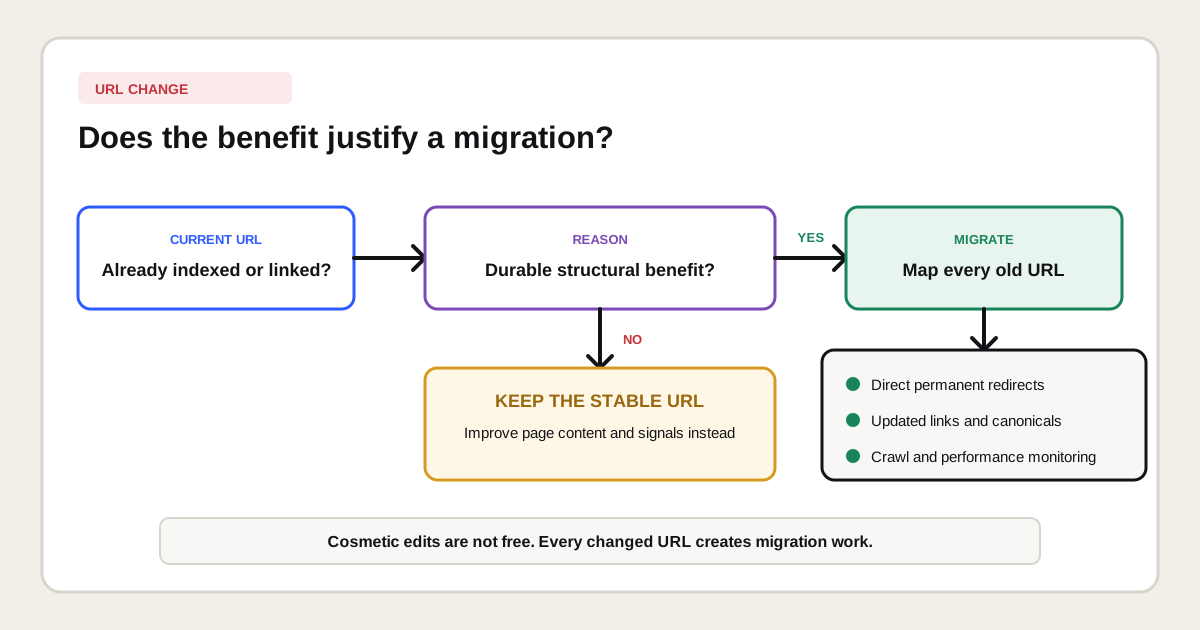
An existing URL should be changed only when the durable benefit outweighs the migration cost. A confusing architecture, platform move, language restructuring, security correction or content consolidation can justify a change. Cosmetic shortening often does not.
| Reason | Default decision | Why |
|---|---|---|
| Remove one stop word | Keep | No meaningful structural improvement. |
| Replace underscore with hyphen | Usually keep | Migration cost can exceed the minor formatting gain. |
| Merge duplicate pages | Change and redirect | One resource will replace several URLs. |
| Move to HTTPS or a new domain | Change with migration plan | Technical and identity change affects every signal. |
| Remove unstable CMS paths | Evaluate as a planned migration | Long-term maintainability may justify one controlled change. |
| Add keywords to a ranking URL | Keep | The URL alone does not justify resetting a stable address. |
How do you change URLs without losing control?
Change URLs with a one-to-one map, direct permanent redirects, updated internal signals and a documented monitoring period. Every old indexable URL needs an explicit outcome before deployment.
- Crawl and export the current URLs, status codes, canonicals, links and sitemap entries.
- Preserve the existing search intent and map each old URL to its closest new equivalent.
- Configure one-hop server-side permanent redirects without chains or loops.
- Update internal links, navigation, canonicals, hreflang, structured data and XML sitemaps.
- Keep removed URLs as 404 or 410 when no relevant replacement exists.
- Test representative templates and every high-value mapping before release.
- Annotate the launch and monitor crawling, indexing, clicks, impressions and conversions.
Google's site move documentationexplains that Google must visit old and new URLs during a move and that crawl timing is not fixed. Read the 301 redirect guide and website migration guide before changing URLs at scale.
How do you create SEO-friendly URLs for a new website?
Create SEO-friendly URLs for a new website by designing the page inventory and hierarchy before publishing slugs. Decide which page owns each intent, which folders represent durable sections and which parameters create a genuinely distinct resource.
- Inventory services, products, locations, languages and editorial content types.
- Cluster pages by user task and choose one canonical page per primary intent.
- Define a lowercase host, trailing-slash and hyphen convention.
- Create stable language and section folders only where they add meaning.
- Write concise slugs in the audience's language.
- Reserve parameter rules for filters, sorting, pagination and tracking.
- Test uniqueness, server responses, links, canonicals and sitemap output before launch.
A URL map should follow the keyword researchand content strategy, not replace them. First decide what useful page should exist, then give that resource a durable address.
Which SEO-friendly URL mistakes matter most?
The most important URL mistakes create duplicate crawl paths, unstable addresses or contradictions between redirects, canonicals, links and sitemaps. A slightly long but stable descriptive path is usually less dangerous than a short URL that changes or multiplies constantly.
- Publishing uppercase and lowercase variants that both return status 200.
- Adding session IDs or campaign parameters to crawlable internal links.
- Letting every filter combination become indexable without demand or inventory.
- Using fragments to load content that needs its own crawlable URL.
- Repeating keywords unnaturally across folders and the final slug.
- Changing slugs whenever a title, year or campaign message changes.
- Redirecting removed pages to an unrelated homepage.
- Leaving old URLs in internal links, canonicals, hreflang or XML sitemaps.
- Assuming fewer folders automatically means fewer clicks from the homepage.
How should duplicate URL variants be normalized?
Normalize duplicate URL variants by choosing one preferred version for each resource and making every technical signal agree with that choice. A website can accidentally expose the same content through HTTP and HTTPS, different hostnames, uppercase and lowercase paths, optional trailing slashes, default filenames or parameter combinations. These variants are different addresses even when a person sees the same page.
Start with server behavior. Redirect non-preferred protocol, hostname and path variants directly to the preferred URL when they should never remain independently accessible. Return a self-referencing canonical on the preferred page, then use that exact address in navigation, contextual links, breadcrumbs, hreflang, structured data and XML sitemaps. A canonical is a consolidation signal; it is not a substitute for preventing avoidable variants or correcting internal links.
Trailing slashes require a consistent policy rather than one universal answer. A server can treat/guide and /guide/ as separate URLs, so select one format and redirect the other when both resolve. The same principle applies to www and non-wwwhosts. Preserve query parameters that produce a genuinely useful, distinct view, but do not allow tracking values, session identifiers or arbitrary parameter order to multiply indexable copies.
Verify normalization with a crawler, browser requests and URL Inspection. Test every common variant and confirm its status code, final destination, canonical and internal-link target. For international sites, do not canonicalize translated pages to one language simply because their layouts are similar. Each valuable language version normally needs its own URL, self-referencing canonical and reciprocal hreflang relationships.
How do you audit URL structure?
Audit URL structure by combining a crawl, server responses, indexation data, internal links and business rules. The result should identify patterns and owners, not merely list long URLs.
| Audit layer | Evidence | Decision |
|---|---|---|
| Uniqueness | Duplicate paths, case variants and parameters | Which URL should represent each resource? |
| Responses | 200, redirect, 404, 410 and redirect chains | Does every requested path return the intended outcome? |
| Consistency | Canonical, internal links, hreflang and sitemap | Do all signals name the same preferred URL? |
| Hierarchy | Folders, breadcrumbs and click paths | Does structure reflect useful sections? |
| Parameters | Facets, sorting, tracking and sessions | Which combinations should be crawled or indexed? |
| Performance | Search Console pages and server logs | Which patterns consume crawling or split visibility? |
Include URL analysis in a technical SEO audit when the issue affects templates, crawl behavior, canonicalization or migrations. Address naming and page ownership through on-page SEO when the path reflects an unclear content and intent model.
How do you measure whether a URL structure works?
Measure whether a URL structure works by monitoring discovery, canonical selection, indexation, organic landing-page performance and the absence of uncontrolled variants. There is no standalone SEO-friendly URL score that proves a structure is successful.
Use crawls and logs to find generated variants and redirect chains. Use URL Inspection to compare declared and Google-selected canonicals. Use Search Console to analyze clicks and impressions by landing page and directory. Connect those pages with analytics and CRM outcomes. After a migration, evaluate old-to-new mapping coverage and combined performance rather than checking only whether the new slug contains the target keyword.
Which primary sources support these URL recommendations?
The crawlability, descriptive-word, audience-language, hyphen, parameter, case-sensitivity, fragment and international URL recommendations on this page are based on the official Google Search Central URL structure guide. Migration guidance is based on Google's documentation for site moves with URL changes.
These sources do not define one ideal character limit, folder count or keyword density for URLs. Recommendations that use a fixed number without a primary-source basis should be treated as a house style or heuristic, not as a universal Google rule.