
What does internal linking mean in SEO?
An internal link points from one URL to another URL on the same website. It can appear in a menu, breadcrumb, article, related-content block, footer, image or pagination component. The defining feature is the destination: it remains within the same website.
Internal linking for SEO is the deliberate use of those links to make important pages discoverable, explain relationships between topics and create useful paths for visitors. The link should still make sense to a reader. A link added only to repeat a keyword or inflate a page's link count is not automatically useful.
Internal links, external links and backlinks
The three terms describe different relationships. Separating them prevents an internal-link audit from being confused with external link building.
| Link type | Destination or source | Example |
|---|---|---|
| Internal link | Another page on the same website | A services page links to keyword research. |
| External link | A page on another website | An article cites an official Google guide. |
| Backlink | Another website links to your website | An industry publication links to a Jakency research page. |
Internal links are largely under your control. Backlinks depend on other website owners and belong to off-page SEO. Both can support discovery and context, but they require different analysis and actions.
What are the SEO benefits of internal links?
Google documents that links help it find new pages and act as a signal when determining page relevance. Internal links also make a website easier to navigate. These benefits do not create a ranking guarantee, but they improve the conditions under which pages can be discovered and understood.
| SEO function | How internal links support it |
|---|---|
| Discovery | A crawlable link gives search engines a path to a URL they may not yet know. |
| Context | The anchor text and surrounding sentence describe why the destination is relevant. |
| Site structure | Links reveal relationships between hubs, categories and supporting pages. |
| Relative importance | Prominent and repeated relevant links can indicate which pages matter within the website. |
| User navigation | Visitors can continue to a useful definition, comparison, service or next step. |
| Sitelink support | A logical structure and concise anchors can help Google's automated systems understand useful shortcuts. |
What makes an internal link crawlable?
Google can generally crawl a link when it is an HTML <a> element with an href attribute that resolves to a valid URL. JavaScript can insert a crawlable anchor, but a click handler on a different element is not an equivalent implementation.
| Implementation | Example | Assessment |
|---|---|---|
| Standard anchor | <a href="/en/seo/services">SEO services</a> | Recommended and crawlable. |
| Styled anchor | <a class="button" href="/en/seo/services">SEO services</a> | Crawlable when the href remains valid. |
| Span with click handler | <span onclick="openPage()">SEO services</span> | Not a reliable crawlable link. |
| Anchor without href | <a onclick="openPage()">SEO services</a> | Not recommended for discovery. |
When links are created or changed through JavaScript, inspect the rendered HTML with browser developer tools and Google's URL Inspection tool. A link that is visible to a user after interaction may not be present in the rendered source available to a crawler.
What is good anchor text for an internal link?
Anchor text is the clickable text of a link. Good anchor text is descriptive, reasonably concise and relevant to both the current page and the destination. It should set an accurate expectation without forcing the same exact keyword into every link.
| Anchor type | Example | Why it matters |
|---|---|---|
| Too generic | Click here | Provides little destination context when read on its own. |
| Clear | technical SEO audit | Explains what the linked page covers. |
| Too long | An entire sentence with several unrelated details | Makes the link harder to scan and weakens its focus. |
| Image link | Descriptive image alt text | Google can use the image's alt attribute as anchor text. |
Natural variation is appropriate when different source paragraphs frame the destination differently. A service page might be linked as "SEO services", "our SEO work" or "technical and content SEO support" when each phrase accurately describes the same page. Avoid mechanically repeating an exact-match anchor across the site.
What types of internal links can a website use?
| Internal link type | Primary use |
|---|---|
| Navigation link | Connects visitors with core sections and high-priority destinations. |
| Contextual link | Connects a sentence or paragraph with a relevant supporting page. |
| Breadcrumb link | Shows hierarchy and provides a route back to parent pages. |
| Related-content link | Offers the next useful article, definition or comparison. |
| Footer link | Provides stable access to important organisation, service and legal pages. |
| Image link | Makes an image a route to a product, case or deeper explanation. |
| Pagination link | Connects pages in a longer listing or archive. |
Contextual links are especially useful because the surrounding text can explain the relationship. Navigation and breadcrumbs provide stable structure. Footer links can help with important destinations, but a sitewide footer is not a substitute for a relevant in-content path.
What is a useful internal-link structure?
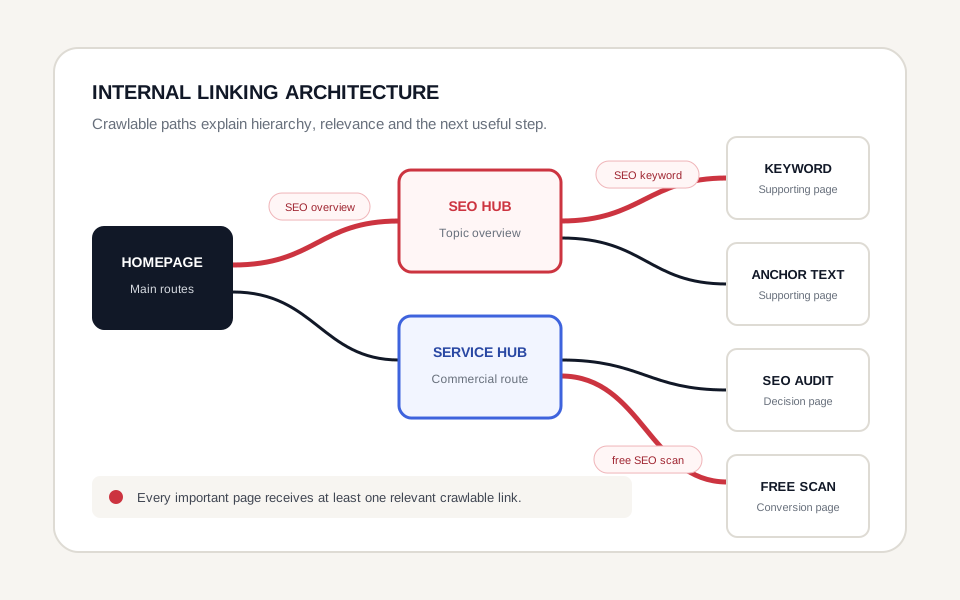
A useful structure lets people and crawlers move from broad pages to specific pages and back again. It reflects topics and user journeys rather than creating a flat list in which every page links to every other page.
| Structural layer | Role | Example |
|---|---|---|
| Homepage | Routes visitors to the main services, proof and organisation pages. | Jakency homepage |
| Hub page | Introduces a broad topic and links to its important subtopics. | SEO or the SEO glossary |
| Supporting page | Answers a narrower question in depth. | This internal-linking definition |
| Cross-link | Connects genuinely related pages in different branches. | An audit page links to Search Console guidance. |
How does hub-and-spoke internal linking work?
In a hub-and-spoke structure, a broad hub links to focused supporting pages and those supporting pages link back to the hub. Relevant spokes can also cross-link when one topic is needed to understand another.
For example, an on-page SEO hub can link to keyword research, content strategy and a practical internal linking strategy guide. A glossary definition can explain terminology, while the deeper guide covers implementation in a service or content workflow. Each URL has a distinct purpose and both remain connected.
How many internal links should a page have?
There is no magical ideal number of internal links for every page. The appropriate number depends on page length, topic, navigation, available supporting resources and what the reader needs next.
Use enough links to make important destinations discoverable and to support the user's task. Remove duplicated, irrelevant or confusing links when they turn the page into a directory instead of an answer. A long reference page can naturally need more links than a short service introduction.
Should every important page receive an internal link?
Yes. Google advises that every page you care about should have a link from at least one other page on the website. In practice, a high-priority page often deserves several relevant routes from a hub, navigation element and contextual source pages.
An XML sitemap can help search engines discover URLs, especially on large or complex sites, but it does not replace a navigable internal structure. People cannot follow a sitemap in the same way they follow contextual links, and the sitemap does not explain the same page relationships.
What is an orphan page?
An orphan page is a page with no crawlable internal link pointing to it. It may still be known through a sitemap, an external link or a previous crawl, but it is disconnected from the website's normal navigation paths.
To fix an orphan page, first decide whether it should exist and be indexed. If it is valuable, link to its canonical URL from one or more relevant pages. If it duplicates another page, is obsolete or has no useful purpose, consolidation, redirection or removal may be more appropriate than adding links.
What is click depth?
Click depth is the number of internal links a visitor or crawler must follow from a chosen starting point, often the homepage, to reach a page. A deeper page is not automatically poor, but high-priority pages should not be hidden behind unnecessary layers.
The popular three-click rule is not a universal Google requirement. Use depth as a diagnostic signal. Compare important pages with similar pages, inspect whether the route is logical and shorten it when users or crawlers must pass through avoidable steps.
Do more internal links always improve rankings?
No. More links can create more routes and increase a page's prominence within the site, but quantity alone does not establish relevance or quality. Links from unrelated pages, repetitive blocks or vague anchors can add noise.
Prioritise links that answer a real next question. A page about content planning can naturally link to keyword research. Linking that same paragraph to an unrelated legal page simply to increase an internal-link count would provide little topical value.
Should internal links use nofollow?
Normal editorial internal links generally do not need rel="nofollow". Nofollow is a link qualification, not a reliable tool for designing site architecture or controlling which internal pages Google indexes.
| Control | What it does | What it does not do |
|---|---|---|
nofollow | Qualifies how a link should be treated. | Does not replace a coherent internal structure. |
robots.txt | Controls crawler access to matching paths. | Does not by itself guarantee that a known URL disappears from search. |
noindex | Requests that an accessible page not appear in search results. | Cannot be processed if crawling is blocked before Google sees it. |
Should internal links point to the canonical URL?
Yes. Internal links should consistently point to the preferred canonical URL rather than redirecting, parameterised or duplicate variants. Consistency reduces unnecessary redirects and reinforces the URL you want visitors and search engines to use.
An internal link is only one canonicalization signal. It does not override conflicting redirects, sitemap URLs, canonical tags or content duplication on its own. Review these signals together during a technical audit.
What are common internal-linking mistakes?
- Important pages have no crawlable inbound link.
- Links rely on click handlers without a valid anchor and href.
- Generic anchor text hides the purpose of the destination.
- The same exact-match phrase is forced into links across unrelated pages.
- Internal links point through redirects or to non-canonical URL variants.
- Broken links return a 404 or other unexpected status.
- Sitewide blocks create hundreds of low-value repeated links.
- New pages are published without links from an existing hub or related content.
- Old pages continue linking to removed or consolidated destinations.
- The XML sitemap is treated as a replacement for site navigation.
How do you build an internal-linking strategy?
A practical internal-linking strategy starts with business priorities and existing page relationships, not with a target number of links.
- List priority pages. Identify the services, categories, products, guides and conversion pages that matter most.
- Map topics and intent. Group pages by subject and the job each page performs in the search and customer journey.
- Choose hubs. Select broad pages that should route visitors to the most useful supporting resources.
- Find existing source pages. Search the site for paragraphs where a destination already fits naturally.
- Add descriptive anchors. Explain the destination in concise language that matches the surrounding context.
- Link back to the hub. Keep the relationship visible in both directions where that helps navigation.
- Use canonical destinations. Remove avoidable redirects, tracking variants and inconsistent protocols.
- Repair gaps. Fix orphan pages, broken links, excessive depth and pages with weak or misleading anchors.
- Review after publication. Add links to new pages from established relevant content and update old links when URLs change.
How do you perform an internal-linking audit?
An internal-linking audit combines a crawl with business and content review. A crawler can inventory URLs and link counts, but it cannot decide whether each link helps the intended audience.
| Audit area | What to check | Desired outcome |
|---|---|---|
| Crawlability | Anchor elements, href values and rendered HTML | Important links are technically extractable. |
| Status | 200 responses, redirects, 404 errors and server errors | Links resolve directly to useful live pages. |
| Canonical target | Protocol, host, path, parameters and canonical declaration | Links point to the preferred URL. |
| Orphan pages | URLs in analytics, Search Console or sitemaps but absent from the crawl | Valuable pages receive a relevant route. |
| Link depth | Steps from the homepage or nearest hub | Priority pages are reachable through logical paths. |
| Anchor text | Generic, duplicated, misleading or excessively long anchors | Anchors are concise, natural and descriptive. |
| Relevance | Relationship between source context and destination | Every contextual link supports the reader's next question. |
| Distribution | Pages with unusually few or many inbound links | Prominence reflects page value and hierarchy. |
| Nofollow and robots | Unexpected link qualifications or blocked paths | Controls match the intended crawling and indexing policy. |
Which tools help with an internal-link audit?
| Tool | Useful for | Limitation |
|---|---|---|
| Website crawler | Link graphs, depth, status codes, redirects, anchors and orphan comparisons | Needs configuration and business context. |
| Search Console Links report | A sample of pages Google sees as internally linked | It is not a complete link inventory. |
| URL Inspection | Rendered HTML, indexing status and a specific URL's Google view | Best for focused diagnosis, not bulk mapping. |
| CMS search | Finding existing mentions that can become contextual links | May miss rendered components or custom data sources. |
| Manual review | Relevance, user journey, anchor clarity and editorial quality | Slower and difficult to scale alone. |
Compare several datasets. A crawler shows the current navigable structure. Search Console indicates part of Google's observed link data. Analytics and conversion data help determine which destinations deserve priority. None of these sources alone provides a complete strategic answer.
How should internal-link opportunities be prioritised?
| Opportunity | Priority signal | Typical action |
|---|---|---|
| High-priority destination | Important service or conversion page has few relevant routes | Add contextual links from established related pages. |
| Existing traction | Page earns impressions but lacks supporting internal context | Strengthen links from the nearest topical hub. |
| Weakly linked page | Useful page is deep or nearly orphaned | Connect it to a hub and suitable related content. |
| New page | Published URL has no launch links | Add it to the planned cluster and relevant navigation. |
| Overlapping pages | Several URLs compete for the same intent | Clarify roles, consolidate where appropriate and update links. |
| User journey gap | Readers lack a logical next step | Link to the comparison, case, service or contact route they need. |
Can internal links create Google sitelinks?
Google chooses sitelinks automatically. Website owners cannot force a specific sitelink or guarantee that one will appear.
A logical site structure, informative titles and headings, relevant links to important pages and concise anchor text can help Google's systems understand useful shortcuts. These practices improve clarity, but the final presentation depends on Google's systems and the user's query.
Internal linking versus external link building
| Dimension | Internal linking | External link building |
|---|---|---|
| Control | Mostly controlled within your website and CMS. | Depends on independent external publishers. |
| Primary role | Discovery, navigation, context and site structure. | External references, reputation and referral paths. |
| Audit focus | Crawlability, relevance, anchors, depth and canonical targets. | Source quality, relevance, placement, qualification and risk. |
Start by making the website coherent and navigable. External mentions cannot compensate for important internal pages that remain disconnected or technically inaccessible. For a full implementation workflow, continue with Jakency's internal linking strategy.
Official sources and factual basis
The main recommendations on this page follow Google's official guidance on crawlable links and anchor text, automated sitelinks, site navigation and page relationships, canonicalization and the Search Console Links report.
Related concepts
- Anchor text: the visible words used in a link.
- Canonical tag: a signal that identifies the preferred version of similar URLs.
- Crawl budget: Google's crawling capacity and demand for a site.
- Google Search Console: Google's reporting and diagnostic platform for Search.
- Technical SEO: crawlability, indexability, performance and technical consistency.
- On-page SEO: content, intent, headings, internal links and page-level relevance.
Keyword cannibalization is only actionable when overlapping URLs serve substantially the same intent and create an unwanted search outcome. Diagnose query-to-page data, page purpose and business impact before merging or redirecting content.
SEO-friendly URLs use a stable, crawlable and descriptive structure without treating the path as a keyword field. Review URL anatomy, parameters, international structures and migration decisions before changing established addresses.