

What is a ChatGPT dot?
A dot is an agent you hand a responsibility to, not a prompt. You give it a goal, it works out the next steps and keeps going between conversations. OpenAI’s launch post from September 29, 2026 calls dots “always-on”: they run on GPT-6 Astra, get their own cloud computer, learn from feedback and can work toward your goals around the clock.
What changes is who takes the initiative. A chat waits for your next message. A dot decides when to pause and wake up, runs background work in parallel and comes back to you when a decision needs your judgment. It starts with your ChatGPT memory and keeps its own notes on your preferences, decisions and open work.
For now you get one primary dot. As The AI Advantage shows in a four-minute demo, it sits above your individual chats and projects: you talk to one assistant, and it starts Codex or ChatGPT Work tasks when the job calls for it. Separately, OpenAI is piloting specialist dots with their own identity and credentials at large companies, and is working with Microsoft to manage them through Agent 365.
| Regular chat | Dot | |
|---|---|---|
| Starts with | Your question | Your goal; the dot plans the steps |
| Between conversations | Waits for you | Keeps working, pauses and resumes on its own |
| Workspace | The conversation | Its own cloud computer with a browser, files and a terminal |
| Memory | ChatGPT memory | ChatGPT memory plus its own notes on ongoing work |
| Where you reach it | ChatGPT | ChatGPT, Slack, Teams and voice calls |
| Initiative | None | Looks for ways to help, using read-only tools |
Is ChatGPT Dots free, and what does it cost?
No, dots are not free, but they have no separate price either. Your first dot comes at no extra cost with Pro or Business Premium. Free, Go and Plus do not include one. OpenAI’s documentation names three Pro tiers as eligible: Pro 100, Pro 200 and Pro 500.
Business Premium means a Premium seat in a ChatGPT Business workspace. According to OpenAI’s Business overview, a Premium seat costs $100 per user per month on an annual plan or $125 on a monthly plan, and gives five times the usage of a Standard seat with no five-hour limit. A Business workspace needs at least two seats in total, so a one-person company pairs one Premium seat with one Standard seat ($20 annual, $25 monthly). That puts the smallest dot-ready workspace at $120 a month billed annually, or $150 billed monthly, before tax. That is our own arithmetic from OpenAI’s list prices.
Talking to your dot does not count toward your ChatGPT usage limits. Tasks it starts in Codex or ChatGPT Work do. OpenAI added extended limits for the first month after launch and says you will later be able to buy more dots, or more speed and monthly capacity per dot. No prices for those yet.
One caveat from the field: the creator of one first-look video saw no dot on the $100 Pro tier and upgraded to $200 to get one. OpenAI lists Pro 100 as eligible, so this most likely reflects the gradual rollout rather than a price threshold.
Can you use ChatGPT dots in the EU, UK or Switzerland?
Yes, but not through Pro. OpenAI rolls dots out to Pro users only outside the European Economic Area, the United Kingdom and Switzerland. Business Premium is rolling out in all supported ChatGPT regions, and Enterprise, Edu and Healthcare workspaces can turn on the beta. That is spelled out in both the ChatGPT documentation and OpenAI’s getting-started article.
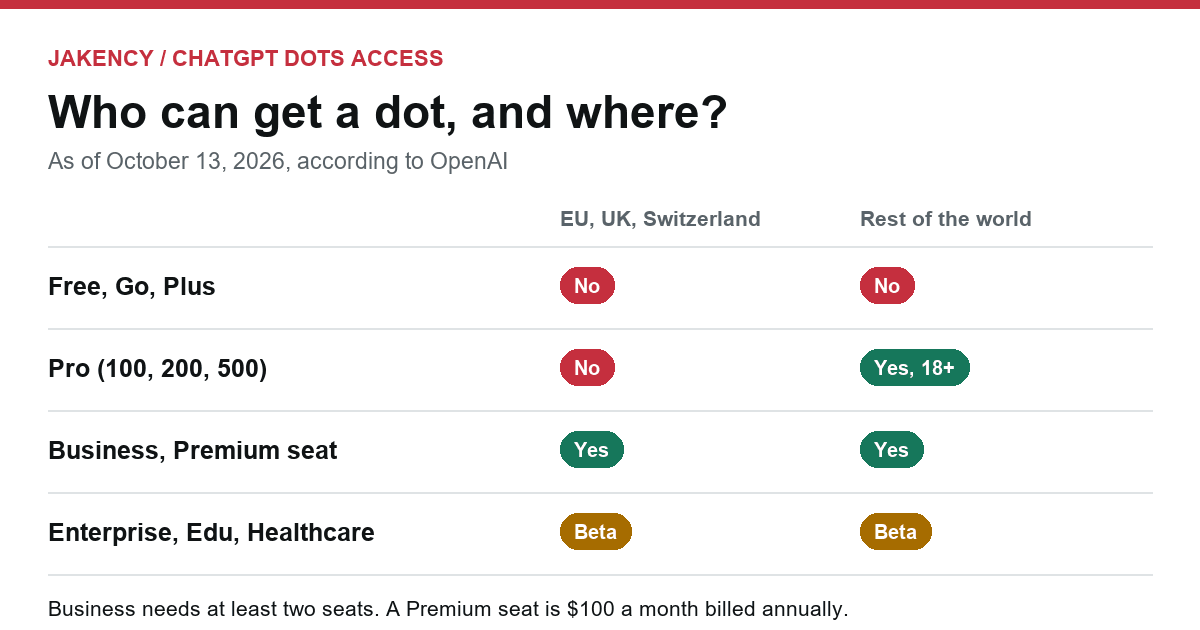
| Plan | EU, UK, Switzerland | Rest of the world |
|---|---|---|
| Free, Go, Plus | No dot | No dot |
| Pro (100, 200, 500) | Not available | Rolling out, users 18 and over |
| Business, Standard seat | No dot | No dot |
| Business, Premium seat | Rolling out | Rolling out |
| Enterprise, Edu, Healthcare | Beta, off until an admin enables it | Beta, off until an admin enables it |
| Texting your dot | Not available | Limited beta for some US Pro users |
Several creators in Europe have tested dots through a US VPN, including a Dutch creator whose phone notifications would not open without the VPN switched on. We would not run a business on that. You would be routing around a deliberate regional restriction with an agent that can read your email, calendar and files. If you are in Europe and want a dot now, a Premium seat is the supported route.
How does a dot actually work?
A dot combines its own cloud computer, the apps you connect and the channels you use to reach it. Your own computer is an optional extra.
Its own cloud computer
Each dot gets a computer with a browser, files and a terminal, where it researches, builds files and runs software while your devices are off. You can open it at any time, click Take over to drive it yourself and Return control when you are done. When a site needs a login, you enter credentials in a private form or take over briefly. OpenAI says dots can use saved passwords without exposing them to the model.
Your computer, only if you allow it
Local access is off by default. You switch it on in the ChatGPT desktop app on the machine you want the dot to use, which then has to stay online with the app open. With access, the dot can use local files and skills, and fall back to your own browser when a site blocks its cloud browser. Revoke access turns it off again.
Apps through plugins
Through ChatGPT’s plugin ecosystem a dot can work with more than 4,000 apps, using the accounts and permissions you already connected. Permission to read is not permission to send. Worth knowing: a dot also reviews connected apps unprompted to find ways to help and can form memories from what it sees. That proactive research runs on read-only tools.
Chat, Slack, Teams and calls
You can message your dot in ChatGPT on web, desktop and mobile, or call it with the phone button in its conversation. You can type during a call, and assigned work carries on after you hang up. In Slack and Teams you DM it or mention it in a channel. Only the owner can direct a dot, but everyone in the channel sees its replies. It cannot call you, and at launch it cannot have an email address of its own.
Scheduling and stopping
A dot does not need a fixed schedule to follow up, but you can ask it for reminders or recurring checks, which then appear under Scheduled. Its profile shows what is in progress, scheduled and completed. Pause stops its main task. Stopping does not undo actions it already took.
How do you set up your first dot?
Setting up a dot well takes five steps: create it on desktop, connect only what it needs, give it context, set rules and start with something read-only.
- Create it on a computer. Use the ChatGPT desktop app or ChatGPT in a desktop browser. OpenAI’s pages disagree on whether the mobile app can create one yet, so plan on desktop. You can talk to it on mobile afterwards.
- Name it. Its handle becomes
@yourname-dotname. You can pick a character or a pet as its avatar. - Connect the minimum. Every app is more access. Start with email and calendar, not your accounting system.
- Write one context document. In his setup walkthrough, one agency owner has his dot read a Google Doc before every task: who he is, what the business does, how he writes and what the dot must never do. Without it, he got generic answers. Our template is below.
- Set custom rules. For each type of action you choose: act without asking, act if pre-approved, ask first, or hand off to you. Asking for a draft does not authorise sending it.
Read this before every task.

Who I am: [name], [role] at [company], a [type of business] in [area].
Our customers: [who], usually reaching us through [channel].
How I write: [tone], first names, no more than [number] sentences per email.

You may: read, summarise, sort and prepare drafts.
Ask me first: anything that leaves the company (email, quote, message in
a client channel) and anything involving money.
Never: make payments, change passwords, confirm contracts or prices, or
answer a customer's question on my behalf.

Updates: routine progress in ChatGPT, decisions in [Slack or Teams].
Only interrupt me for: an at-risk deadline, a customer who has waited
twice without a reply, or an overdue invoice.
Make the first job read-only, for example: “Look at my email and calendar for this week and tell me which promise I am most likely to forget. Don’t act on it yet.” In the walkthrough above, that surfaced results the creator had promised a client by email and never sent. Tell it early which updates you want. Paul J Lipsky’s dot started pinging him about every incoming email, so he told it to stop, and it did.
What work is worth delegating to a dot?
The best work for a dot recurs, depends on information already sitting in your apps, and has mistakes that can be caught before they leave the building. This split is our recommendation, built from OpenAI’s examples and the creator tests below.
| Job | What the dot does | What you sign off |
|---|---|---|
| Unpaid invoices | Matches your accounting app against your inbox, lists late payers, drafts reminders | Every reminder that goes out |
| Inbound requests | Flags the emails that need a reply today and drafts answers | Prices, dates and commitments |
| Client feedback in Slack or Teams | Logs feedback per client in your task board and acknowledges it | Any answer to a new question or request |
| Market watch | Checks chosen websites on a schedule and reports only what is new | Nothing, as long as it only reads |
| Content repurposing | Turns an interview or webinar into show notes and social posts in your voice | Everything that goes public |
| Reporting | Updates a deck or summary when new numbers arrive | The conclusions |
If a task is identical every time, with the same steps and the same sources, a fixed workflow is usually cheaper and more predictable than an agent that reasons from scratch. That is the kind of AI automation we build. A dot earns its keep where every case is a little different.
What did early testers run into?
Initiative is what impressed early testers most, and reliability in the first days is what let them down. These are creator observations, not our measurements.
- It speaks up first. Right after setup, Paul J Lipsky’s dot flagged a billing problem with his hotel and an email he had left unanswered. Half an hour after he chased a sponsor for payment, it reported the money had already arrived. Useful, though better before the email.
- Voice changes the routine. Riley Brown calls his dot on walks and says he cleared 25 emails on one of them. He also has it start Codex sessions, send a morning summary at 9:00 and run an hourly check that stays quiet unless something matters.
- Schedules pile up fast. In another test by The AI Advantage, the dot had seven scheduled tasks within a day and overnight noticed a visa application with no update for eight days. Creating a tracking page took five minutes, and Amazon blocked the agent outright.
- Launch-day rough edges. In the first-look video the call button never connected, the plugin list would not scroll, and the dot only used Airbnb’s filters after being told to. A second dot could not be created.
- Team workflows. The agency owner had his dot compile ten roofing companies whose websites lack a chat feature into Google Sheets, then wired it into client Slack channels: feedback goes to Notion, open questions go to him, and the dot never answers on his behalf.
Creators mostly compare dots with Grokbot, Muse and OpenClaw. The difference they mention most is that a dot lives inside ChatGPT, next to your chats, projects, memory and plugins. One found Grokbot more mature at launch; another keeps Muse for personal errands and uses his dot as a chief of staff.
What do dots mean for your website?
Dots give your website a new kind of visitor: an agent comparing, checking and following up for a customer. If that agent cannot read your page, you are not in its shortlist. In the tests above, dots hunted for rentals, camper vans and holiday homes by working through websites, and OpenAI notes that some sites block cloud browsers or demand extra verification.
OpenAI does not document how a dot picks a supplier. What you control is whether anything stands in its way:
- Key facts in plain text. Services, area, price range, lead times and contact details belong in your page HTML, not only in a PDF, an image or a script.
- Firewall and bot rules. Ask whoever runs your hosting or CDN whether automated browsers are blocked, and whether that is intentional.
- One version of the truth. An agent that finds three different prices or service areas may skip you or describe you wrongly.
- Test it yourself. Ask an agent in ChatGPT to visit your site and summarise your services, prices and area. Whatever it misses, a dot will miss too.
The same groundwork decides whether AI answers mention you at all. Our checklist for a website that is ready for AI search covers the signals to check, and ChatGPT vs Google search explains how the two differ. If you want an outside view of where you stand today, see our GEO services.
How do you keep a dot under control?
A dot can make mistakes and acts with whatever access you give it, so the controls are yours to set: narrow access, written rules and a person signing off on anything that leaves the company.
- Mistakes. OpenAI says plainly that dots still make mistakes, including when following your rules. Review anything with consequences, such as invoices and client emails.
- Hidden instructions. Web pages can contain instructions meant to mislead an agent. OpenAI runs safeguards and monitoring that can pause or stop a dot, but no filter is perfect.
- Your data. OpenAI does not train on Business, Enterprise or Edu content by default. Personal plans have a setting for it. Disconnecting an app does not delete what the dot already learned from it; only Reset does.
- Sensitive steps. Changing a password always stays with you, whatever your rules say.
- Enterprise admin settings. In OpenAI’s admin guide, dots, local computer access and custom rules are all off by default, and admins enable them per role.
Teams that let staff work with agents also need agreements and training on who may connect what. In the EU, the AI Act has required organisations to ensure sufficient AI literacy among people who use AI systems since February 2, 2025. If you want help drawing up those rules, see how we approach AI for businesses.
What else do people ask about ChatGPT Dots?
Short answers to the questions that come up most, as of October 13, 2026.
Can I get ChatGPT Dots on the Plus plan?
No. Plus includes scheduled tasks, projects and ChatGPT Work, but not a dot. OpenAI says it plans to bring dots to more users without naming a date or a plan. Until then you need Pro, a Premium seat in ChatGPT Business, or an Enterprise, Edu or Healthcare workspace where an admin has enabled the beta.
Can I use a VPN to get dots in Europe?
Some creators tested dots through a US VPN. For business use we advise against it. OpenAI excludes the EEA, UK and Switzerland from the Pro rollout on purpose, and a dot reaches into your mail, calendar and files. If you are in Europe and need a dot now, a Premium seat in ChatGPT Business is the route OpenAI supports.
Can a dot control my own computer?
Only if you allow it. A dot works on its own cloud computer by default. Local access stays off until you confirm Allow access in the ChatGPT desktop app on that computer, which must stay online with the app open. The same profile screen lets you revoke access again.
Can my dot call me or send email from its own address?
Not at launch. You can call your dot from ChatGPT, but it cannot initiate calls to you. It can use your connected personal email for tasks, but it cannot have a standalone email address yet. Texting is a limited beta for some Pro users in the US through a third-party provider.
How many dots can I have?
One primary dot for now. OpenAI says you will later be able to add more dots and buy extra speed or monthly capacity per dot, with pricing still to be announced. Specialist dots with their own identity and credentials are currently limited to focused pilots with large enterprises.
How do I delete a dot and what it remembers?
Use Reset in the menu on your dot’s profile. It deletes the dot together with its conversations, saved memories and scheduled tasks. Disconnecting an app is not enough, because information the dot already pulled from that app stays. After a reset you create a new dot on desktop.