
Updated . The numerical example below is illustrative, not client performance data.
What exactly does "(not provided)" mean?
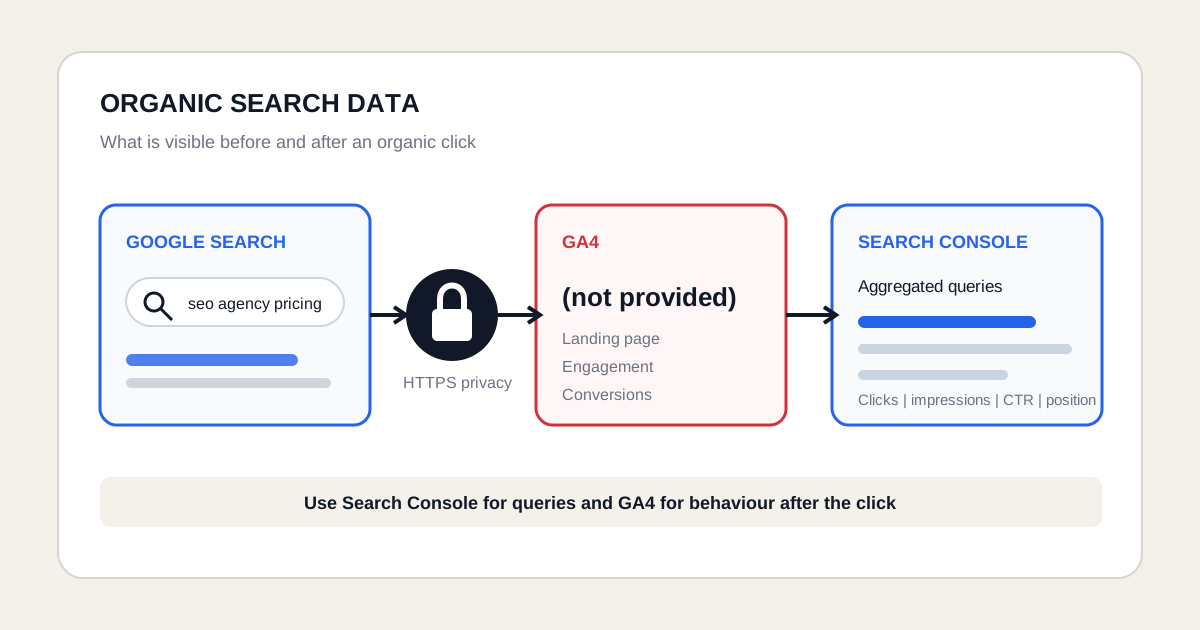
"(Not provided)" is a placeholder for an organic Google search query that was withheld from Analytics. It does not mean that Google failed to record the search visit. It means the keyword field does not contain the exact words the searcher typed.
| Data area | What you can see |
|---|---|
| Usually available in GA4 | Session source and medium, landing page, device, aggregated location, engagement, events and conversions. |
| Unavailable from the organic keyword field | The exact Google query connected to a specific user, session or conversion. |
| Available in Search Console | Aggregated queries, clicks, impressions, CTR and average position for Google Search. |
This is expected behaviour and does not automatically indicate a broken tracking setup. The label became familiar in historical keyword reports. In GA4, the available dimensions and report layout differ: do not expect an old Universal Analytics keyword screen to exist unchanged. Use the current Search Console query reports and GA4 landing-page reports for the tasks described here.
Why does Google Analytics show "(not provided)"?
Google Analytics shows "(not provided)" because most Google searches use HTTPS and Google does not pass the organic query through the referrer data used by Analytics.
Google introduced this privacy protection gradually from 2011 onwards. As secure search became standard, most Google organic keyword data stopped appearing in web analytics reports. The user can still land on your site and complete measurable actions, while the original query remains protected.
Does "(not provided)" mean Google did not record the visit?
No. The visit can still appear as organic search traffic. GA4 may record the landing page, session source, engagement, events and conversions even though the exact organic search query is withheld.
Is "(not provided)" a tracking error?
Usually not. A high share of "(not provided)" is normal for Google organic search.
Investigate tracking when broader acquisition data is also incorrect. Warning signs include missing organic sessions, absent landing pages, incorrect source and medium values, or a sudden break after changes to consent, tagging or analytics configuration. Learn what GA4 can measure on the Google Analytics 4 for SEO page.
What is the difference between "(not provided)" and "(not set)"?
"(Not provided)" and "(not set)" describe different reporting situations.
| Value | Meaning |
|---|---|
| "(not provided)" | Most commonly appears for Google organic keywords because the query was withheld. |
| "(not set)" | A broader placeholder used when Analytics has no value for a selected dimension in that event, session or report context. |
Do not treat "(not set)" as proof that Google hid an organic keyword. Its cause depends on the dimension and report being analysed.
Can you recover "(not provided)" keywords?
You cannot reliably recover the exact organic search query for every individual Analytics session or conversion. Old filters, URL rewrites and third-party estimates do not restore user-level query data that Google did not pass to Analytics.
You can still analyse organic search demand in aggregate with Google Search Console. For practical SEO decisions, combine Search Console query and page data with GA4 landing-page behaviour and conversions.
Where can you see organic search queries?
Use the Search Console Performance report to view the queries that generated impressions and clicks for your website in Google Search.
| Search Console metric | Meaning |
|---|---|
| Queries | Search terms that showed your website, subject to privacy filtering. |
| Pages | Landing pages that received impressions and clicks. |
| Clicks | Visits from a Google Search result to the website. |
| Impressions | How often a result from the website was shown. |
| CTR | Clicks divided by impressions. |
| Average position | The average top position of the website for the selected data. |
How do you find queries for one landing page?
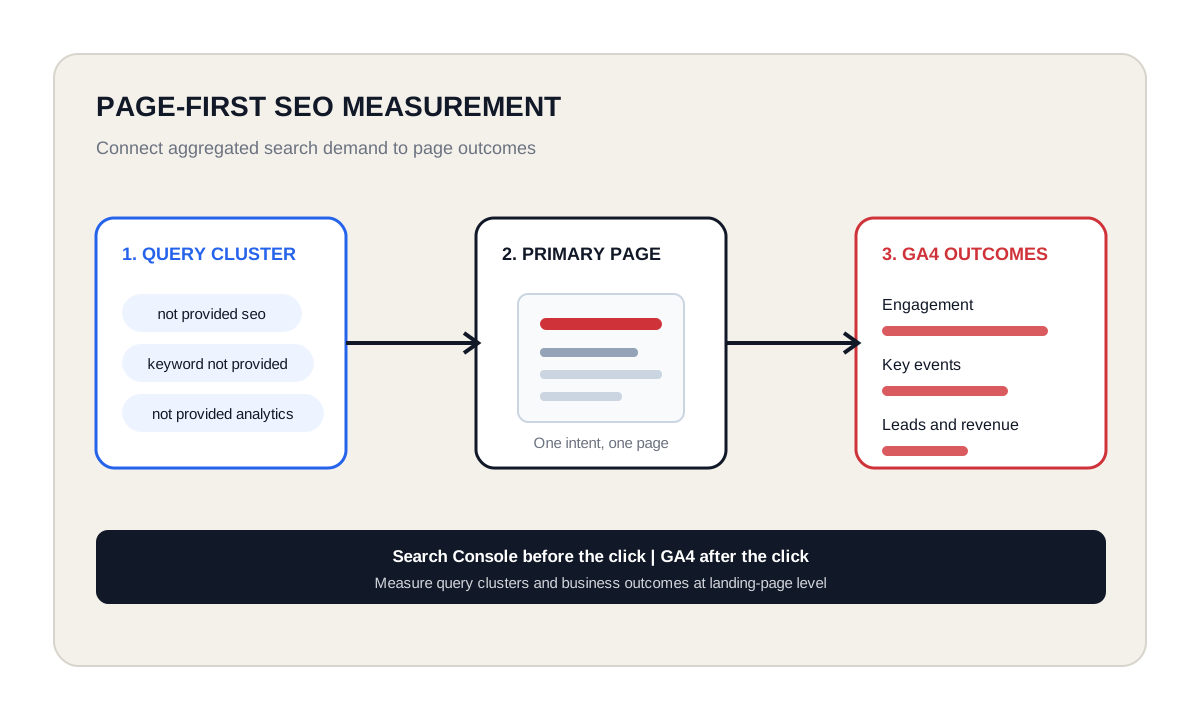
Filter Search Console by page before reviewing the Queries table. This connects a query cluster to the page Google actually displayed.
- Open Performance and select Search results.
- Choose the required date range and search type.
- Add a Page filter or select a page from the Pages table.
- Open the Queries table.
- Compare clicks, impressions, CTR and position for the queries connected to that page.
- Repeat the analysis for branded and non-branded query groups.
This page-first method is more useful than treating every query as a separate content target. Group related terms by search intent and improve the page intended to satisfy that cluster.
Can you connect Search Console to GA4?
Yes. Linking Search Console to GA4 adds reports for organic Google queries and landing pages. The Search Console collection is not always visible in GA4 by default. An editor or administrator may need to publish it from the report Library.
| GA4 Search Console report | What it provides |
|---|---|
| Queries report | Search queries and Search Console metrics for the linked property. |
| Google organic search traffic report | Landing pages with Search Console and Analytics metrics. |
| Maximum data window | Up to 16 months of Search Console Performance data. |
Does linking Search Console restore keyword-level conversions?
No. The integration does not create a one-to-one path from an individual organic query to an individual user or conversion.
Search Console reports aggregated activity before the click. GA4 reports behaviour after the click. The tools use different systems, metrics, attribution rules and privacy protections. Connecting them improves page-level analysis but does not remove those boundaries.
How should SEO teams work without session-level keyword data?
Use a page-first measurement model. Identify which query clusters lead to a landing page, then measure what visitors do on that page.
| Measurement layer | Practical action |
|---|---|
| 1. Query cluster | Group Search Console queries by intent, topic, brand and commercial stage. |
| 2. Primary page | Assign every important cluster to one intended landing page. |
| 3. Search performance | Measure impressions, clicks, CTR, position context and query coverage. |
| 4. On-site performance | Measure engagement, events, leads, sales or other conversions in GA4. |
| 5. Change log | Record which title, content, internal link or technical change was published and when. |
What does a page-first SEO report look like with actual numbers?
Keep search visibility and website outcomes in separate measurement columns, joined only at an appropriate aggregated level. This worked example uses invented data for /services/roof-repairs, one country and the same 28 calendar dates. It is an illustrative reporting model, not a screenshot of Google Analytics or a client case.
| Source and scope | Measurement | Value |
|---|---|---|
| Search Console, page total | Google Search impressions | 12,000 |
| Search Console, page total | Google Search clicks | 480 |
| Search Console, page total | CTR: 480 / 12,000 x 100 | 4% |
| Search Console, visible query rows | Clicks represented in the exported queries | 360 |
| GA4, google / organic sessions | Sessions starting on the landing page | 400 |
| GA4, same session scope | Sessions with at least one successful request | 20 |
| GA4, same session scope | Session request rate: 20 / 400 x 100 | 5% |
The visible query export represents 360 / 480 = 75% of page clicks. The 120-click difference does not reveal the hidden queries. Check privacy filtering, export limits and identical filters before explaining the gap. Do not distribute the missing clicks among visible keywords as if their identities were known.
The 20 sessions with a request support a page-level observation, not a keyword conversion rate. If two query clusters account for the 360 visible clicks, you still cannot say how many of those 20 sessions came from either cluster. Copying the page's 20 request sessions onto both query rows would create a misleading total of 40.
The practical conclusion is narrower and useful: this page has measurable Google visibility and generates requests among recorded Google organic sessions. Inspect the query mix to judge relevance; inspect the page and sales feedback to judge request quality. These are complementary investigations, not reconstructed visitor histories.
How do you reproduce the example with your own website?
- In Search Console, open Performance > Search results. Select Web, the dates and the country you want to analyze.
- Select the landing page in Pages or add an exact Page filter. Record the page totals before opening and exporting Queries.
- In GA4, open the landing-page report available in your report collection. Use a session-scoped google / organic filter, not all Organic Search if you want a Google-only comparison.
- Match the landing page and calendar dates. Check the hostname when one property covers multiple sites, and document any difference in time zones or URL normalization.
- Select the verified successful-request event. For a session rate, count sessions in which that event occurred, not the raw number of repeated events.
- Aggregate each source before combining page-level rows. Keep the query export separate from session outcomes and write down the limitations.
A missing GA4 report can reflect a customized collection or insufficient permissions. Ask an editor to publish the relevant report rather than assuming your data was not collected. For the linked reports, Google's Search Console integration instructions explain the required property and data-stream connection.
How do Search Console and GA4 work together?
Search Console explains how users found the website in Google Search. GA4 explains what happened after they arrived.
| Journey stage | Main tool | Decision supported |
|---|---|---|
| Before the click | Search Console | Queries, pages, impressions, clicks, CTR and position. |
| After the click | GA4 | Landing-page sessions, engagement, events, conversions and revenue where configured. |
| Combined decision | Page-level analysis | Which query clusters attract visits and whether the page produces the intended outcome. |
Why do Search Console and GA4 numbers differ?
Search Console and GA4 measure different events, use different processing systems and apply different attribution and privacy rules.
- A Search Console click is not the same metric as a GA4 session.
- A user can click more than once within one session or leave before Analytics records the visit.
- Consent settings, ad blockers and tag implementation can reduce GA4 data.
- Search Console applies privacy filtering and does not display every query.
- Time zones, property scope, canonical URLs and processing times can differ.
Can third-party SEO tools replace hidden query data?
No third-party tool can recreate the exact organic query for every Analytics session. SEO tools can estimate rankings, search volume, competitors and likely keyword opportunities. Some platforms combine Search Console, Analytics and ranking data, but the result remains a model rather than recovered user-level query data.
Use these tools for keyword research, competitor analysis and opportunity discovery, not as proof that a specific hidden query caused a conversion.
Does Google Ads still provide keyword data?
Google Ads provides reporting for paid search keywords and search terms, but that data applies to advertising campaigns. It does not reveal the hidden organic query for an Analytics session.
Keep paid and organic reporting separate. Use Google Ads for paid search performance and Search Console for aggregated organic Google Search queries.
Should you still use keywords in SEO?
Yes. Keyword research remains useful for understanding language, demand and search intent, even though Analytics does not show the exact organic query for every visit.
Modern SEO uses query clusters and page intent instead of trying to attribute every conversion to one exact keyword. Search Console, landing pages, content quality and conversion data together provide a more reliable decision model.
What should an SEO report include instead of hidden keywords?
| Report section | What to show |
|---|---|
| Query coverage | Branded and non-branded query clusters connected to each important page. |
| Landing-page performance | Clicks, impressions, CTR and position context by primary page. |
| Organic behaviour | Engagement, key events and conversion rate after the organic click. |
| Business outcomes | Leads, revenue, appointments or other qualified outcomes. |
| Implementation context | Published changes, dates, seasonality, campaigns and other influences. |
| Data limitations | Privacy filtering, sample size and differences between Search Console and GA4. |
Official sources and factual basis
Google documents the HTTPS cause of "(not provided)", Search Console query privacy limits and the Search Console reports available in GA4. The main references for this page are Google Analytics traffic-source documentation, Search Console query dimensions and privacy limits and the GA4 Queries report documentation.
Related concepts
- Google Search Console: aggregated queries, impressions, clicks and indexing data.
- Google Analytics 4: behaviour and conversions after an organic visit.
- Keyword research: finding and grouping search demand and intent.
- Search intent: the purpose behind a search query.
- Landing pages: where organic visitors arrive and conversion is measured.