
Published on | Updated on
What is GA4 for SEO?
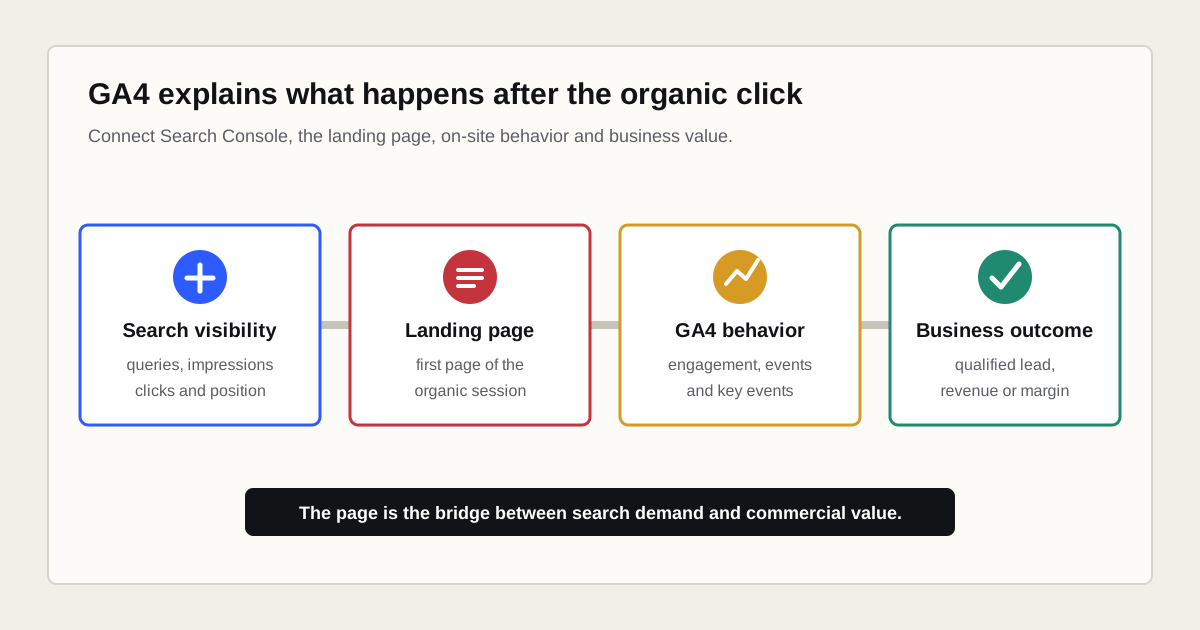
GA4 for SEO is the use of Google Analytics 4 to evaluate the on-site behavior and outcomes of visitors acquired through organic search. The central analysis unit is usually the organic landing page, because it connects a search visit with engagement, events, key events, ecommerce revenue or a later qualified lead.
GA4 does not measure organic rankings and does not reveal every query that produced a session. Google Search Console measures how a verified property performs in Google Search. GA4 measures activity collected through an Analytics tag on the website or app. Google describes Search Console as the source of truth for Search performance and Analytics as the source of truth for behavior inside the site.
| Question | Primary source | Why |
|---|---|---|
| Which Google queries show a page? | Search Console | Query, impression, click, CTR and position data originate there. |
| Which page started an organic session? | GA4 | The Landing page dimension is session scoped. |
| Did the visitor submit, call or purchase? | GA4 plus CRM or commerce system | Events show the action; business systems confirm quality and value. |
| Why did clicks fall? | Search Console first | Search type, query, page, country and device patterns help isolate the change. |
| What did visitors do after arrival? | GA4 | Engagement, paths and events occur on the tagged site. |
What can GA4 measure for SEO?
GA4 can measure users, sessions, landing pages, page views, engagement, events, key events and revenue associated with traffic classified as Organic Search. It can also segment the results by device, country, content group and other available dimensions. The exact coverage depends on tag implementation, consent, reporting identity and event design.
- Organic sessions and new users
- Landing pages that started organic sessions
- Engaged sessions, engagement rate and engagement time
- Downloads, outbound clicks, site searches and supported video interactions
- Forms, calls, bookings and other implemented lead events
- Recommended ecommerce events, items and revenue
- Paths followed after an organic landing page
- First-user, session and event-scoped acquisition outcomes
Measurement does not make every metric useful. A scroll event can show that 90 percent of a page became visible, but it does not prove careful reading or satisfaction. An outbound click can be valuable on a partner page and undesirable on a checkout page. Interpret the event according to the page task.
What can GA4 not tell you about SEO?
GA4 cannot independently tell you which organic Google queries produced impressions, what average position a page held or why Google selected a specific canonical. It also cannot reconstruct an exact query for every user, session or conversion after Google withheld that information.
- It does not replace the Search Console Performance report.
- It does not turn an aggregated Search Console query into user-level attribution.
- It does not diagnose crawling, indexing or canonical selection by itself.
- It does not prove causality because a conversion followed an organic session.
- It does not know whether a lead became commercially qualified unless that data is returned.
- It does not measure visitors whose activity was not collected.
- Its engagement metrics are not documented Google Search ranking factors.
This boundary is useful. It stops SEO reports from presenting an Analytics estimate as a ranking explanation or claiming exact keyword revenue that the available data cannot support.
How should GA4 be configured before SEO analysis?
Configure GA4 around business decisions before building an SEO dashboard. Verify the web data stream, tag coverage, consent behavior, internal traffic rules, cross-domain needs, event names and key events. Test real journeys rather than assuming a tag installation is complete.
- Confirm that the intended GA4 property and web data stream are used.
- Verify the Google tag on all indexable templates and important conversion steps.
- Review Enhanced measurement settings instead of accepting every option blindly.
- Test page views, session starts and important actions in Realtime and DebugView.
- Use recommended event names where an appropriate event exists.
- Mark only meaningful business outcomes as key events.
- Exclude internal and developer traffic through a documented process.
- Configure cross-domain measurement when a journey moves between owned domains.
- Link Search Console and select the correct property and web stream.
- Record the setup, owner, test date and expected values.
Enhanced measurement can collect page views, 90 percent scrolls, outbound clicks, site searches, supported YouTube interactions and file downloads. Google requires site owners to ensure that personally identifiable information is not collected. Review privacy, consent and legal requirements for every market in which the website operates.
Which GA4 reports are most useful for SEO?
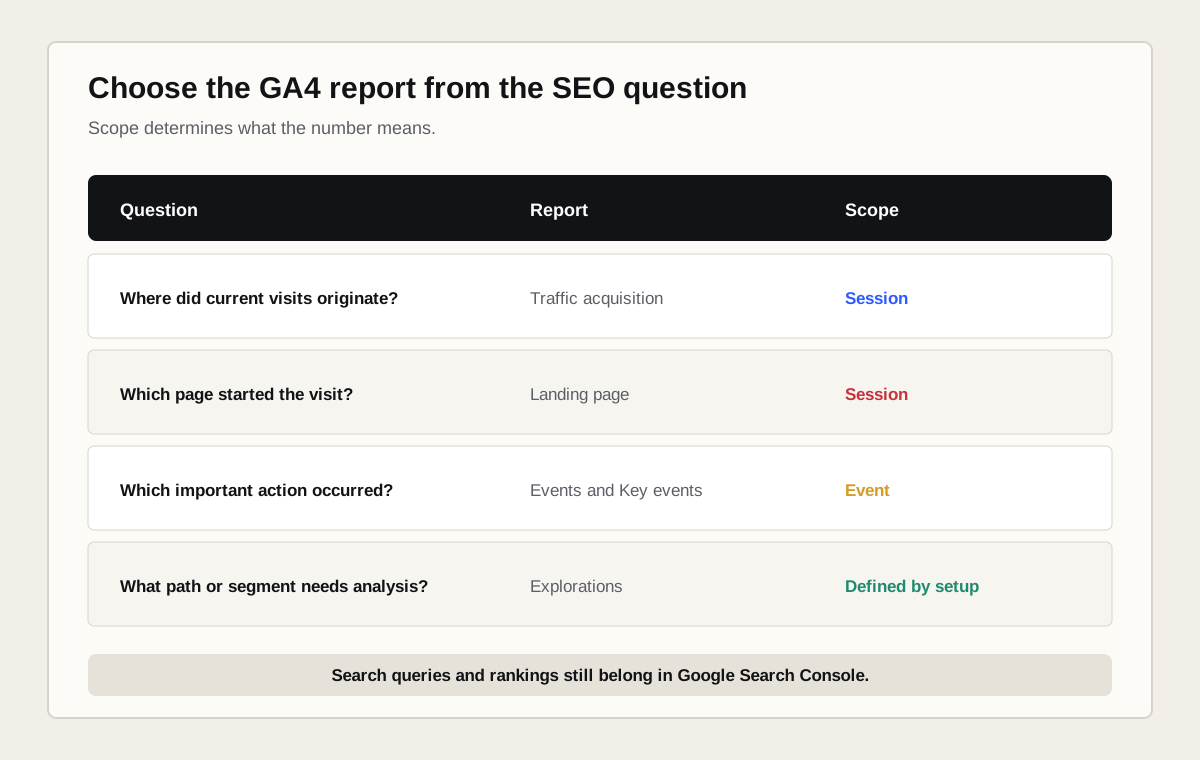
The most useful GA4 reports for SEO are Traffic acquisition, Landing page, Events and Key events. User acquisition answers a different question about first acquisition. Explorations are useful when the standard reports cannot represent a page segment, path or funnel clearly.
| Report | Scope or role | SEO use | Common mistake |
|---|---|---|---|
| Traffic acquisition | Session | Compare sessions acquired through Organic Search. | Reading Session source as the first source ever used by the person. |
| User acquisition | First user | See how new users were first acquired. | Comparing values directly with session-scoped reports. |
| Landing page | Session landing page | Evaluate the first page of organic sessions. | Using Pages and screens as if every viewed page were a landing page. |
| Events and Key events | Event | Validate outcomes and diagnostic interactions. | Calling every click a conversion. |
| Explorations | Chosen dimensions and segments | Analyze content groups, funnels and paths. | Mixing incompatible scopes or relying on a short retention window. |
| Search Console collection | Aggregated Search data | Review queries and Google organic landing pages. | Expecting query-level GA4 conversion attribution. |
How do you find organic search traffic in GA4?
Open Reports, select Acquisition and open Traffic acquisition. Use Session default channel groupas the primary dimension and select or filter Organic Search. This includes non-ad traffic from search engines according to GA4 channel rules, not only Google.
- Set a date range that supports the decision and includes a useful comparison.
- Filter Session default channel group to Organic Search.
- Add Session source / medium when you need to separate Google, Bing and other sources.
- Review sessions, engaged sessions, key events and revenue together.
- Add Landing page + query string when the report supports the required page analysis.
- Save the report or exploration with the exact scope in its name.
GA4 currently classifies non-ad links in organic-search results, including Google AI Overviews and AI Mode, under Organic Search. External AI assistants may appear under referral, direct or a custom channel depending on referrer and campaign data. A custom channel group can support internal analysis, but definitions and changes must be documented.
How do you analyze organic landing pages in GA4?
Open Reports, select Engagement and open Landing page. Filter the report to Organic Search or add Session source / medium to isolate the desired source. The Landing page dimension describes the first page viewed in a session, which makes it the shared key between acquisition and on-site outcomes.
Evaluate each landing page against its intended task. A service page may need qualified enquiries. A comparison page may assist a later return. A glossary article may create broad discovery and internal journeys. Segment templates or content groups before comparing pages with fundamentally different jobs.
| Page task | Primary outcome | Supporting signals | Do not overvalue |
|---|---|---|---|
| Service page | Qualified lead or revenue | CTA use, form starts, calls | Raw page views |
| Product or category | Purchase and margin | View item, add to cart, checkout | Engagement time alone |
| Guide | Useful next action or assisted value | Internal path, download, signup | 90 percent scroll alone |
| Local page | Call, route, booking or enquiry | Device and location patterns | National averages |
| Contact page | Successful contact | Form errors and completion | Long reading time |
How do you connect Search Console to GA4?
In GA4, open Admin, find Product links, select Search Console links and create a link between one Search Console property and the relevant web data stream. You need sufficient permissions in both products. Check whether the selected Search Console property matches the canonical site scope you intend to analyze.
The integration makes two report types available. Google Organic Search Queriesshows queries with Search Console metrics. Google Organic Search Traffic shows landing pages with Search Console and Analytics metrics. The Search Console collection is unpublished by default, so an editor may need to publish it from the report Library.
Search Console data in Analytics is limited to the selected web data stream and a maximum of 16 months. Search Console data can be delayed. Its metrics are compatible with Search Console dimensions and a limited set of Analytics dimensions, including landing page, device and country.
Can GA4 connect organic keywords to conversions?
GA4 cannot reliably connect every organic Google query to an individual session and conversion. The linked query report remains aggregated Search Console data. The integration does not restore the hidden query value or create a user-level join between a Search Console search and every event.
Use the landing page as the shared analysis unit. Search Console shows which query clusters and pages earn visibility and clicks. GA4 shows how organic sessions beginning on those pages behave. CRM or commerce data confirms commercial quality. You can infer that a page and query cluster contribute to value, but should not label that inference as exact keyword revenue.
Why do GA4 sessions and Search Console clicks not match?
GA4 sessions and Search Console clicks do not match because they are different measurements. A person can click more than once within one session, leave before the Analytics tag collects an event, refuse consent or reach a non-HTML resource that is not tagged. Reporting logic, canonical handling and filtering also differ.
| Cause | Search Console behavior | GA4 behavior | Check |
|---|---|---|---|
| Measurement unit | Counts Search clicks | Counts tagged sessions and events | Compare trends rather than equality |
| Consent or tag failure | The click can still exist | The session may not be collected | Test consent states and tag coverage |
| Canonical URL | Reports on Google canonical | Reports collected page location | Normalize page keys before blending |
| Search type | Web, image, video, news and Discover can be separated | Uses acquisition classification | Align the intended Search type |
| Bot handling | Uses Search-specific processing | Excludes known bots and spiders | Expect some difference |
| Time and attribution | Search reporting rules | Property time zone and acquisition scope | Align dates, country and device |
Google advises that small discrepancies are normal. Investigate a large divergence when the direction or page pattern differs, especially after a tag, consent, domain or website change.
Which acquisition scope should SEO reports use?
Use the scope that matches the question. First user dimensions describe how a user was first acquired. Session dimensions describe what initiated a session. Event-scoped acquisition dimensions distribute credit for key events according to the selected attribution model.
- First user source / medium: how a new user was first acquired.
- Session source / medium: what initiated the current session.
- Source / medium: attributed credit for an event or key event.
Do not place these dimensions in one table and treat the values as interchangeable. For an SEO landing-page report, session scope is usually the clearest starting point. For assisted journeys and key-event credit, review event-scoped attribution separately and state the model used.
Which GA4 metrics should an SEO dashboard include?
An SEO dashboard should include only metrics that support a recurring decision. A practical page-level view combines Search Console visibility, GA4 session behavior and business outcomes. Avoid a single composite SEO score that hides the reason a result changed.
| Layer | Metric | Source | Decision |
|---|---|---|---|
| Visibility | Impressions, clicks, CTR, position | Search Console | Does the page earn Google exposure? |
| Acquisition | Organic sessions and users | GA4 | How much tagged traffic arrives? |
| Use | Engaged sessions and page paths | GA4 | Does behavior fit the page task? |
| Outcome | Key events and session key event rate | GA4 | Does the session produce an intended action? |
| Commercial quality | Qualified leads, pipeline, margin, revenue | CRM or commerce system | Does the traffic create business value? |
| Change log | Publication, release and campaign dates | Operational record | Which intervention may explain a pattern? |
Build cross-source reporting in Looker Studioonly after definitions, filters and URL normalization are stable. A dashboard can visualize inconsistent data very efficiently without making it correct.
How should key events be configured for SEO?
An event records an interaction or occurrence. A key event is an event marked as important to business success. Mark completed outcomes rather than every micro-interaction. A form start can diagnose friction, while a verified form submission is closer to a lead outcome.
- Use a successful submission or confirmation, not a submit-button click alone.
- Track telephone links separately from confirmed connected calls when possible.
- Use recommended ecommerce events and validate item, currency and value parameters.
- Prevent duplicate events caused by multiple tags, history changes or repeated confirmations.
- Test event names, parameters and key-event status before using the data in decisions.
- Return lead quality and revenue to a system that can distinguish valuable outcomes.
Enhanced measurement events are useful diagnostics, but they are rarely sufficient as a complete conversion model. A 90 percent scroll, file download or outbound click may support a page task without representing a qualified lead or sale.
GA4 can identify landing pages and journeys that deserve investigation. A documented conversion rate optimization workflow then combines analytics, user evidence, controlled experiments and commercial outcomes.
How do you interpret engagement rate for SEO?
GA4 defines an engaged session as a session that lasts longer than 10 seconds, has a key event or has at least two page or screen views. Engagement rate is the share of engaged sessions. Bounce rate is the opposite share under this definition.
Read engagement in context. A visitor can obtain a complete answer from one page and leave without creating an engaged session. Another visitor can trigger an event that was configured too broadly. Compare similar page types, inspect key-event quality and use qualitative evidence before deciding that a low or high rate reflects content quality.
How do you investigate an organic traffic drop?
Start an organic traffic-drop investigation in Search Console because it shows whether Google impressions or clicks changed. Then use GA4 to determine whether tagged sessions and outcomes show the same page, country and device pattern. A GA4-only decline can point to tracking, consent, classification or site changes rather than lost Search visibility.
- Annotate the first visible date and the affected business outcome.
- Compare Google Search clicks and impressions for the same period.
- Segment both sources by page, country and device where compatible.
- Check tag releases, consent changes, redirects, canonicals and domain changes.
- Separate all Organic Search from google / organic where needed.
- Review landing-page and key-event patterns, not only the site total.
- Record the supported cause, remaining uncertainty and next test.
How do GA4 and UTM parameters interact?
GA4 uses referrer, integrations and campaign parameters to classify acquisition. UTM parameters should describe external campaign links, not internal navigation. Internal UTM links can replace acquisition context and fragment reports. Read the full UTM parameter guidefor naming, testing, auto-tagging and governance.
Organic search traffic normally does not need manual UTM tagging. Search engines and Analytics classify supported organic visits through source information and channel rules. Keep campaign parameters out of canonical links, sitemaps and internal navigation.
What are the most common GA4 SEO reporting mistakes?
- Using GA4 as the source for Google rankings and impressions.
- Calling Organic Search the same thing as google / organic.
- Comparing User acquisition directly with Traffic acquisition.
- Treating Pages and screens as a landing-page report.
- Claiming exact keyword revenue from aggregated Search Console queries.
- Marking every interaction as a key event.
- Ignoring consent, internal traffic, cross-domain journeys and duplicate tags.
- Reporting leads without CRM qualification or sales feedback.
- Comparing Search Console clicks and GA4 sessions as identical units.
- Building a dashboard before validating the source data.
- Using average engagement time as a universal content-quality score.
- Changing filters, channels or event definitions without a change log.
What does a practical GA4 SEO workflow look like?
A practical workflow begins with a page and a decision, not a sitewide average. It combines Search Console, GA4 and business data at the most stable shared level available, then records the change so a later comparison is meaningful.
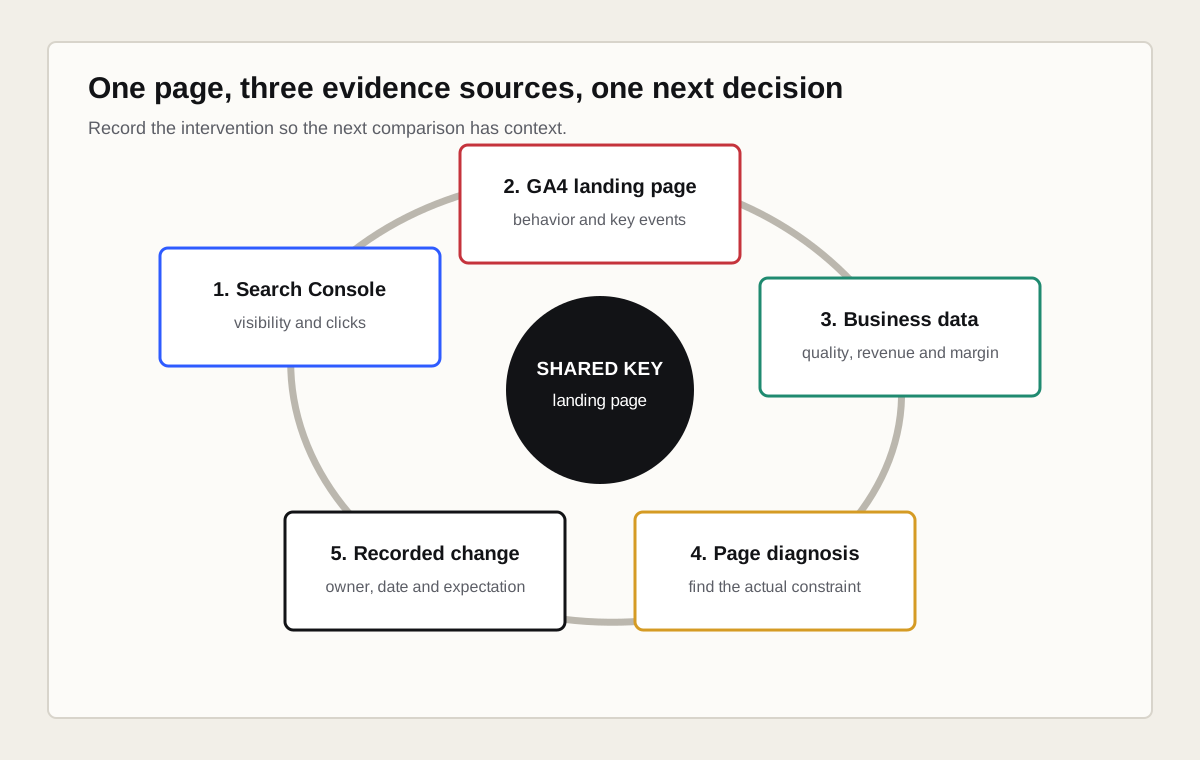
- Select a commercially important landing page or page group.
- Measure Google queries, impressions, clicks, CTR and position in Search Console.
- Measure organic sessions, engagement and key events in GA4.
- Confirm lead quality, revenue or margin in the business system.
- Diagnose whether the constraint is visibility, click appeal, page use or conversion.
- Implement one coherent content, technical or conversion improvement.
- Record publication date, owner and expected effect.
- Compare the same definitions after enough data has accumulated.
What should a GA4 SEO audit deliver?
A GA4 SEO audit should deliver a measurement map, implementation findings, report definitions, event and key-event inventory, Search Console link check and prioritized correction plan. The output should state which historical periods remain comparable after each correction.
| Audit area | Evidence | Deliverable |
|---|---|---|
| Tag coverage | Templates, Realtime, DebugView and network collection | Missing, duplicate and misconfigured tag list |
| Acquisition | Source, medium and channel distributions | Classification and campaign correction plan |
| Landing pages | Session-scoped page and query-string variants | Normalized page reporting model |
| Events | Names, parameters, duplicates and business meaning | Event specification and QA cases |
| Key events | Observed outcomes and sales validation | Primary and diagnostic event hierarchy |
| Search Console | Property, stream, report access and date coverage | Validated integration and limitations |
| Governance | Owners, release records and report definitions | Measurement dictionary and change log |
For a broader technical and search diagnosis, combine measurement review with an SEO audit. For recurring cross-source reporting, define the data model before creating a Looker Studio dashboard.
Which primary sources support this guide?
This guide uses current official Google documentation for report scope, Search Console linking, landing pages, events, channel definitions and data discrepancies. Product interfaces can change, so verify live documentation before turning a report path into a permanent operating procedure.
- Google Search Central: using Search Console and Analytics data for SEO
- Google Analytics Help: connect Search Console to Analytics
- Google Analytics Help: Landing page report
- Google Analytics Help: User acquisition versus Traffic acquisition
- Google Analytics Help: default channel group
- Google Analytics Help: Enhanced measurement events
- Google Analytics Help: events and key events