
Published on
What are UTM parameters?
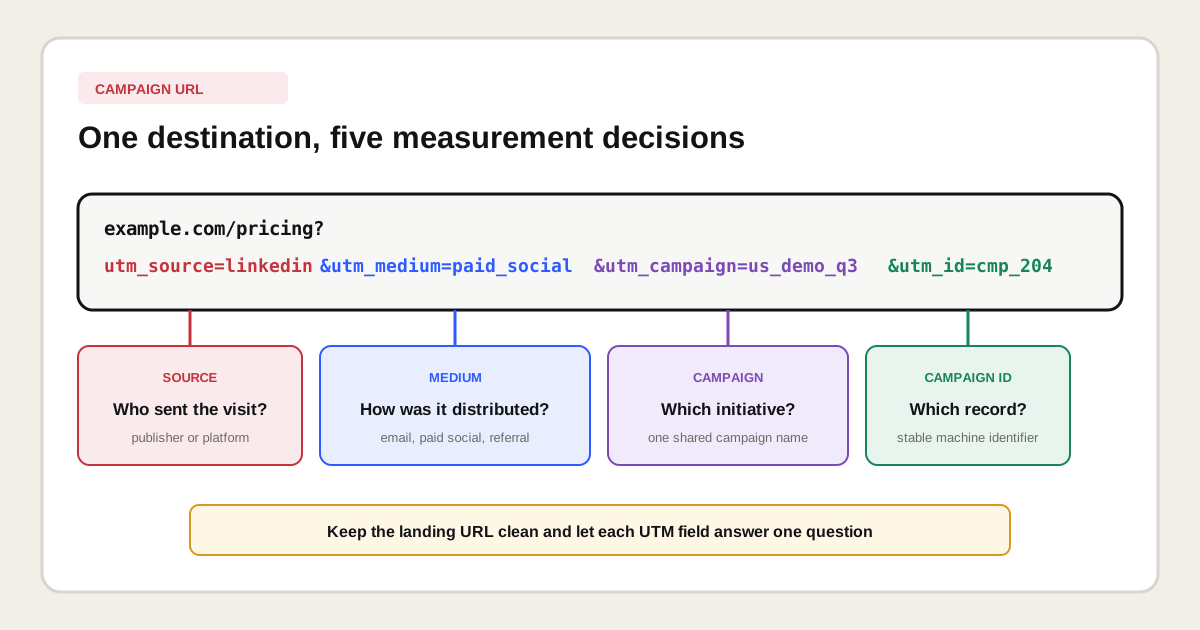
UTM parameters are name-value pairs in a URL query string that identify the marketing context of a visit. The destination remains the same web page, while values such as utm_source=linkedin and utm_medium=paid_social tell GA4 where the click came from and how the campaign was distributed.
The letters UTM originated with Urchin Tracking Module, but current implementation should follow Google Analytics 4 documentation rather than older Universal Analytics habits. A UTM value is measurement metadata. It does not change the visible content, create an advertising integration or prove that a campaign caused a conversion.
https://example.com/pricing?utm_source=linkedin&utm_medium=paid_social&utm_campaign=us_demo_q3&utm_id=cmp_204&utm_content=founder_videoHow is a UTM campaign URL structured?
A UTM campaign URL combines a clean destination with a query string. The first parameter follows a question mark, each name is paired with a value through an equals sign and later pairs are separated by ampersands. Parameter order does not change their meaning.
| URL component | Example | Purpose |
|---|---|---|
| Destination | https://example.com/pricing | The actual landing page visitors should reach. |
| Query start | ? | Starts the first query parameter. |
| Name and value | utm_source=linkedin | Connects one recognized key with one chosen value. |
| Separator | & | Separates the following parameter pair. |
| Fragment | #plans | Points to a location in the document and comes after the query string. |
If the destination already has a query parameter, add the first UTM pair with an ampersand instead of another question mark. Encode spaces and reserved characters correctly. A URL builder prevents many syntax errors, but it cannot decide whether your naming model is useful.
Which UTM parameters does GA4 support?
GA4 supports core campaign identifiers plus optional context fields. Google currently says to always include utm_source, utm_medium and utm_campaignwhen adding campaign parameters. Its guidance also strongly recommends setting relevant values for utm_id and utm_source_platform.
| Parameter | Use | Example value | Reporting note |
|---|---|---|---|
utm_id | Stable campaign identifier | cmp_204 | Supports campaign ID dimensions and data matching. |
utm_source | Specific referrer or publisher | linkedin | Populates manual source dimensions. |
utm_medium | Distribution method | paid_social | Influences source grouping and channel classification. |
utm_campaign | Marketing initiative name | us_demo_q3 | Populates manual campaign name dimensions. |
utm_term | Paid keyword or audience detail | seo_agency | Appears in manual term dimensions. |
utm_content | Creative, placement or link variation | founder_video | Appears in manual ad content dimensions. |
utm_source_platform | Platform managing the traffic | linkedin_ads | Populates manual source platform dimensions. |
utm_creative_format | Creative type | video | Google documents the key but says it is not currently reported. |
utm_marketing_tactic | Targeting tactic | prospecting | Google documents the key but says it is not currently reported. |
A documented parameter is not automatically a useful reporting dimension today. That distinction matters for utm_creative_format and utm_marketing_tactic. Store essential distinctions in fields that your reporting actually exposes, or register them separately in the campaign registry until product behavior changes.
What is the difference between source, medium and campaign?
Source identifies the specific origin, medium identifies the type of distribution and campaign groups related activity under one marketing initiative. Keeping those levels separate lets reports compare publishers, channels and initiatives without mixing them.
| Question | Parameter | Good answer | Poor answer |
|---|---|---|---|
| Who sent the visit? | utm_source | linkedin | social_campaign |
| How was it distributed? | utm_medium | paid_social | linkedin_spring_ad |
| Which initiative owns it? | utm_campaign | us_demo_q3 | click_here |
| Which execution was clicked? | utm_content | founder_video | version_final_2 |
Do not put the channel in every field. A value such as linkedin_paid_social_linkedin_q3 is hard to aggregate and repeats information. Each parameter should answer one stable business question.
Which campaign links should receive UTM parameters?
Tag links when you control an external campaign placement and need to distinguish its traffic from other sources. Do not tag every clickable element. The rule depends on whether the click begins a visit, whether another integration already identifies it and whether the parameter would replace useful acquisition context.
| Link type | Tag? | Reason | Better method when not tagged |
|---|---|---|---|
| Email newsletter to website | Yes | Email clients often provide weak referral context. | Not applicable |
| Paid social ad | Usually | Values can identify platform, campaign and creative. | Use the platform integration if it fully covers reporting. |
| Partner website link | Yes, by agreement | Separates a managed partnership from generic referral traffic. | Referral source when no campaign agreement exists. |
| QR code or printed material | Yes | The browser otherwise lacks meaningful referrer data. | Use a controlled short redirect that preserves the UTMs. |
| Google Ads click | Prefer auto-tagging | Connected products provide richer platform dimensions. | Test a documented mixed-tagging requirement. |
| Internal banner or navigation link | No | It can overwrite the session campaign context. | Track an event with placement and creative attributes. |
| Canonical, sitemap or internal content link | No | Search and crawl signals should use the clean resource URL. | Use the canonical landing URL. |
Why should internal links not use UTM parameters?
Internal links should not use UTM parameters because campaign tagging is designed to describe how a visit enters the property. Adding a new campaign value after the visitor has already arrived can replace the acquisition context and produce misleading session reports.
Internal tags also create alternate URLs for the same page. Keep navigation, contextual links, breadcrumbs and XML sitemaps pointed at clean canonical URLs. Measure internal promotions with events such as select_promotion or a controlled custom event, using component, location and creative fields that do not pretend to be a new traffic source.
How should a UTM naming convention be designed?
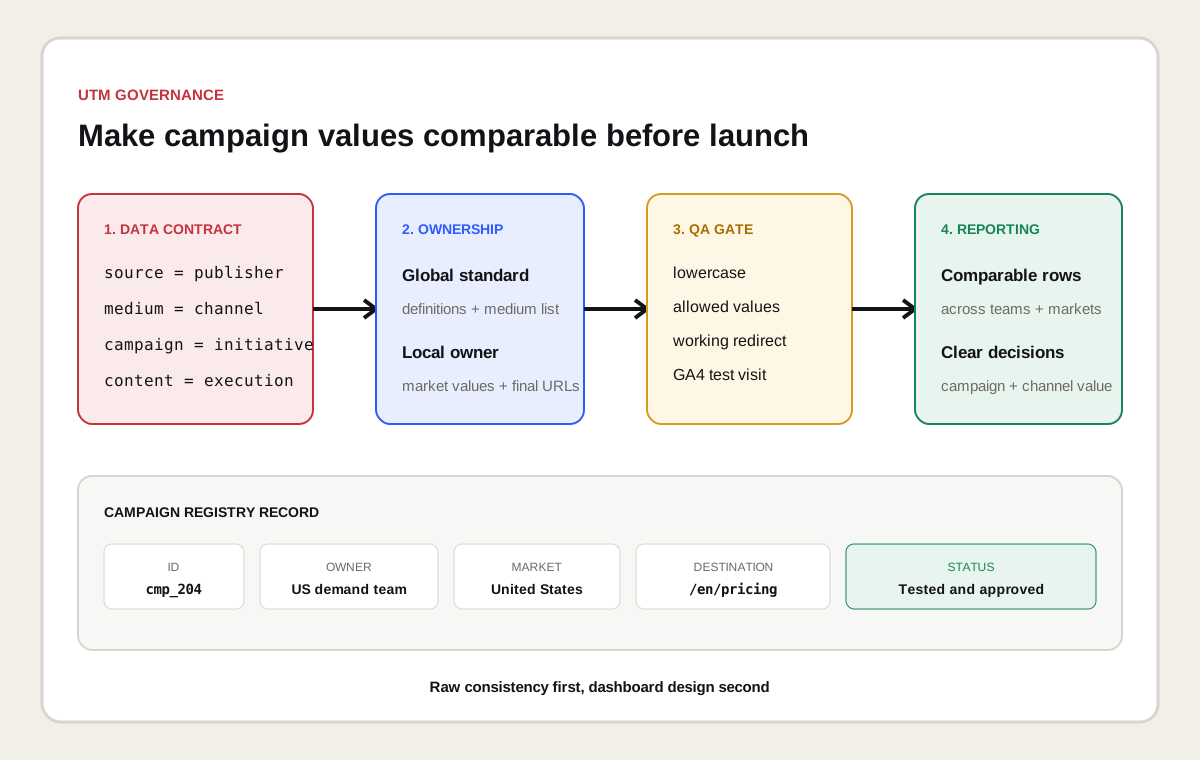
Design a UTM naming convention as a controlled data model rather than a writing preference. Define the allowed values, owner, separators, casing, abbreviations and change process before people start building URLs. A campaign registry should remain readable without inspecting the ads.
- Use lowercase values because GA4 treats different cases as different values.
- Choose one separator such as an underscore or hyphen and use it consistently.
- Reserve
sourcefor a publisher, platform, list or partner. - Maintain an allowed-medium dictionary aligned with reporting channels.
- Give every campaign a human name and a durable machine ID.
- Use
contentfor one agreed creative or placement taxonomy. - Keep dates, regions and audiences only where they support a real reporting decision.
- Record the final URL, owner, launch date and status in a shared registry.
Do not encode every available attribute into one long value. If region is already fixed by the campaign ID and creative is available in utm_content, repeating both insideutm_campaign increases error risk without adding a new analytical dimension.
What UTM examples work for common channels?
Useful UTM examples use the same field logic across channels while allowing channel-specific detail. The exact vocabulary is an organizational choice, but each value should be stable, understandable and compatible with the GA4 channel definitions you use.
| Channel | Source | Medium | Campaign | Content |
|---|---|---|---|---|
customer_newsletter | email | retention_q3 | pricing_cta | |
| Paid LinkedIn | linkedin | paid_social | us_demo_q3 | founder_video |
| Organic social | linkedin | organic_social | research_launch | chart_post |
| Partner | partner_name | affiliate | referral_2026 | directory_profile |
| Webinar partner email | partner_name | email | analytics_webinar | invite_one |
| Printed conference QR | conference_name | qr | event_demo | booth_banner |
Validate medium values against your reporting rules. Google's default channel group uses rule-based definitions, and unusual values can place traffic in Unassigned. A custom channel group can support an internal taxonomy, but it does not repair historical inconsistencies in the raw campaign values.
How do you build a UTM URL step by step?
Build a UTM URL by starting with the final tested landing page, then applying approved campaign values and validating the complete click path. The same checklist works whether the link is assembled manually, through Google's Campaign URL Builder or in a campaign platform.
- Open the clean HTTPS landing URL and confirm it returns the intended page.
- Select the existing campaign ID and campaign name from the registry.
- Choose a source and medium from the approved dictionaries.
- Add term, content and source platform only when they answer a reporting question.
- Encode spaces and special characters rather than pasting unsafe text.
- Check that the URL contains one question mark and valid ampersand separators.
- Open the complete URL in a test browser and follow every redirect.
- Confirm that the final address preserves the intended UTM values.
- Verify the visit in GA4 Realtime or DebugView and later in acquisition reporting.
- Store the approved URL and a screenshot or test record in the campaign registry.
How should spaces and special characters be handled?
Spaces and reserved characters should be encoded so the URL remains valid and values are not split accidentally. A URL builder normally handles encoding. For human-defined taxonomy, lowercase ASCII values with a consistent separator remain easier to review and compare.
Do not paste an ampersand, question mark or hash into a raw value. Those characters have structural meaning in a URL. Avoid decorative punctuation and changing campaign names after launch. If a public display URL needs to look short, use a controlled redirect that preserves every parameter and resolves to the expected canonical landing page.
How do redirects affect UTM tracking?
Redirects affect UTM tracking when they remove, rename or move query parameters before the analytics tag reads the landing page. Test the entire redirect chain, including link shorteners, regional routing, HTTP to HTTPS, trailing-slash normalization and login or consent flows.
Google lists stripped campaign information as one possible cause of direct traffic. Preserve the original query string where the redirect destination should retain campaign attribution. Keep the chain short, return the correct status and verify both the final browser URL and the reported session. Never assume that a short-link dashboard proves GA4 received the same values.
How do UTM parameters work with Google Ads auto-tagging?
Google Ads auto-tagging adds click identifiers and can provide richer linked-product dimensions than manual UTM tagging. Google recommends auto-tagging for supported integrations. Manual and automatic values can coexist in specific measurement designs, but the result must be tested.
Current Google documentation explains that automatic values normally supply cross-channel classification when click identifiers work. It also documents fallback cases where the presence of any UTM parameter can cause cross-channel values to be derived from UTM parameters exclusively. A partial manual tag can therefore create (not set) values or reduce detail. Link the advertising account, enable the documented auto-tagging setup and add manual fields only for a clearly defined downstream requirement.
Where do UTM parameters appear in GA4 reports?
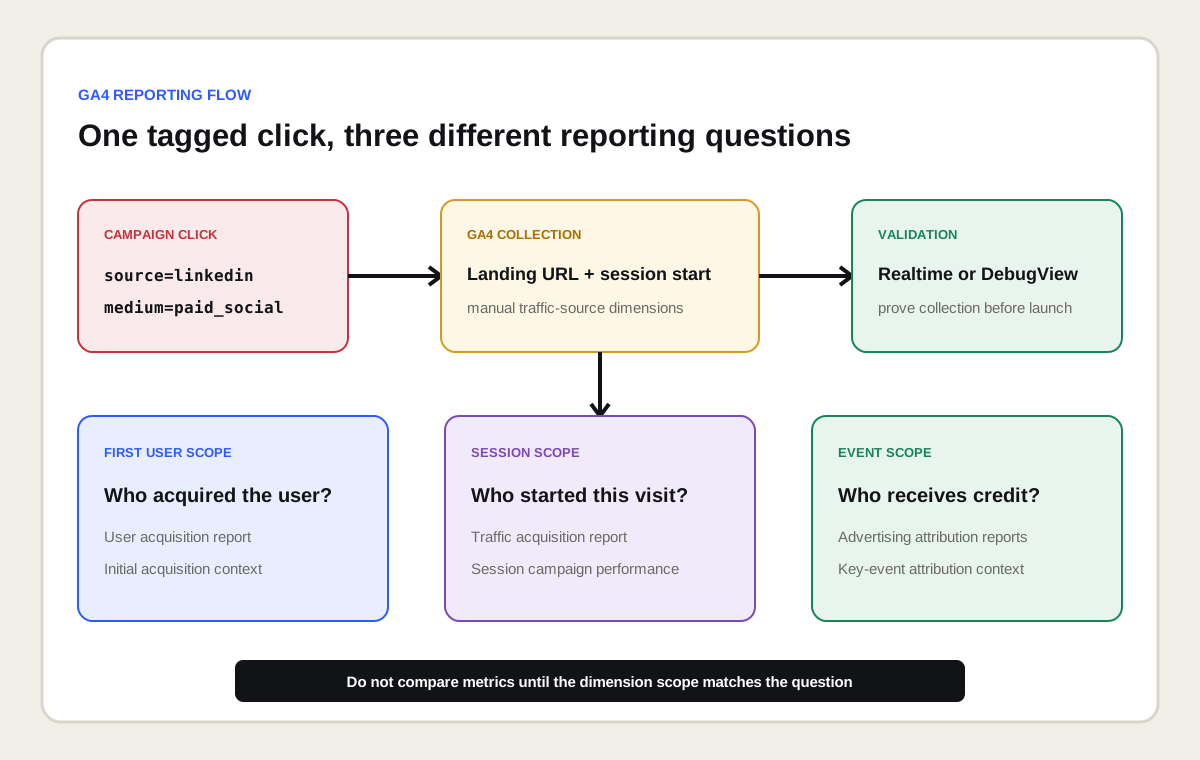
UTM values appear through manual traffic-source dimensions at user, session and event scope. Use the scope that matches the question. First-user dimensions describe initial acquisition, session dimensions describe the origin of a session and event-scoped dimensions support attribution reporting for key events.
| Question | GA4 area | Typical dimension | Interpretation |
|---|---|---|---|
| Which campaign acquired new users? | User acquisition | First user manual campaign name | Initial acquisition, not every later visit. |
| Which campaign started sessions? | Traffic acquisition | Session manual source / medium | Session-scoped campaign performance. |
| Which manual tags were collected? | Manual campaigns | Session manual campaign ID or content | Dedicated view of manual campaign dimensions. |
| Which touchpoints received key-event credit? | Advertising | Source, medium or campaign | Event-scoped values under the selected attribution model. |
| Which exact URL arrived? | Exploration | Page location | Full collected URL, subject to privacy and cardinality limits. |
The GA4 guide for SEO measurement explains how session behavior and key events complement search visibility. Do not compare User acquisition and Traffic acquisition totals as if their left-hand dimensions had the same scope.
How do you test UTM parameters before launch?
Test UTM parameters by proving the URL, redirect, analytics collection and final report value as separate steps. One successful page load is not enough because the browser can reach the content while a redirect removes the parameters or the analytics configuration fails to start a session.
| Test layer | Evidence | Failure found |
|---|---|---|
| Syntax | Parsed URL and expected name-value pairs | Second question mark, broken encoding or empty field. |
| Destination | Correct content and status code | Wrong locale, expired page or campaign draft. |
| Redirect | Final URL and redirect history | Removed query string or unexpected short-link destination. |
| Collection | GA4 Realtime or DebugView | Tag, consent, session or property mismatch. |
| Classification | Manual campaign and channel dimensions | Unassigned channel, wrong case or partial tags. |
| Outcome | Key event and CRM reconciliation | Traffic arrives but the business event is not measured. |
Why does GA4 show direct, unassigned or not set?
GA4 can show direct, Unassigned or (not set) when campaign context is missing, malformed, stripped, collected too late or incompatible with the selected dimension and channel rules. Diagnose the raw visit before renaming values inside a report.
- Direct / none: no clear referral or usable campaign information reached the session.
- Unassigned: the reported source and medium did not match a channel rule.
- (not set): GA4 did not receive the value needed for the selected dimension.
- Fragmented rows: casing, spelling or separator variants created distinct values.
- Unexpected source: a redirect, payment domain, self-referral or mixed tagging changed context.
Start with a known test URL, inspect the final Page location and compare manual session dimensions. Then check the campaign registry, redirect logic, consent behavior, tag timing, cross-domain setup and channel definitions. Avoid bulk find-and-replace fixes that hide the source of the error.
How should UTM governance work across teams and countries?
UTM governance should define one global data contract with controlled local values. A central owner maintains parameter definitions and reporting rules, while regional teams can add approved market, language or campaign values without inventing new meanings for source and medium.
Keep a campaign registry with campaign ID, display name, owner, market, start date, destination, source, medium, creative code, final URL and QA status. Add validation in templates or campaign platforms where possible. Review new values before launch and audit unknown values monthly. Retire a value without rewriting historical campaign records.
Multilingual campaigns should link to the audience's real language page, not rely on automatic redirection from one generic URL. The multilingual SEO guideexplains how localized intent, canonicals and hreflang differ from campaign attribution.
What privacy rules apply to campaign URLs?
Campaign URLs must not contain personally identifiable information or sensitive data. Google Analytics policies prohibit sending data such as names, personal email addresses and phone numbers. A URL can also appear in browser history, server logs, screenshots, support tickets and referrer data.
Use anonymous campaign and creative codes. Never place customer names, email addresses, account numbers, precise personal locations or free-text form answers in UTM values. Review consent and retention requirements for every target market, and involve legal counsel where local privacy law or the campaign design creates uncertainty.
Do UTM parameters affect canonical URLs and SEO?
UTM parameters do not provide an organic ranking benefit. They normally identify a campaign visit to content that already has a clean canonical URL. Search engines can still discover parameterized variants when they are linked publicly, so technical signals should identify the stable resource.
Keep internal links, hreflang, structured data and XML sitemaps on the clean URL. Return a self-referencing canonical for the landing page without campaign parameters when the content is equivalent. Do not block parameterized URLs in a way that prevents a search engine from seeing the canonical. The SEO-friendly URL guide covers parameter handling, duplicate variants and URL normalization in more detail.
What should a UTM audit deliver?
A UTM audit should deliver a parameter inventory, taxonomy diagnosis, redirect test, GA4 mapping and prioritized correction plan. Its purpose is to restore decision-quality campaign data, not to produce a cosmetic list of inconsistent names.
| Audit area | Evidence | Decision |
|---|---|---|
| Coverage | Live campaigns and destination URLs | Which external links need tags or auto-tagging? |
| Taxonomy | Distinct source, medium, campaign and content values | Which values should be standardized going forward? |
| Collection | Realtime tests and Page location | Does GA4 receive the intended values? |
| Classification | Manual dimensions and channel groups | Why is traffic fragmented or Unassigned? |
| Attribution | User, session and event-scoped reports | Which report answers each business question? |
| Governance | Registry, owners and QA records | How will new errors be prevented? |
Connect campaign findings with a technical SEO auditwhen redirects, canonicals, international routing or duplicate URL variants are involved. Use Looker Studio only after the source data and scopes have been validated. A polished dashboard cannot repair inconsistent campaign inputs.
Which primary sources support this UTM guide?
The parameter definitions, case-sensitivity rule, recommended fields and Campaign URL Builder instructions come from Google's official URL builder documentation. Manual-tagging, auto-tagging and fallback behavior are based on Google's traffic-source tagging documentation.
Scope and report distinctions use Google's traffic-source scope guide and Manual campaigns report documentation. Privacy recommendations follow Google's policy guidance for avoiding personally identifiable information. Product interfaces and reporting support can change, so the live documentation should be checked before changing a measurement standard.