
Published on
What does Open Graph mean?
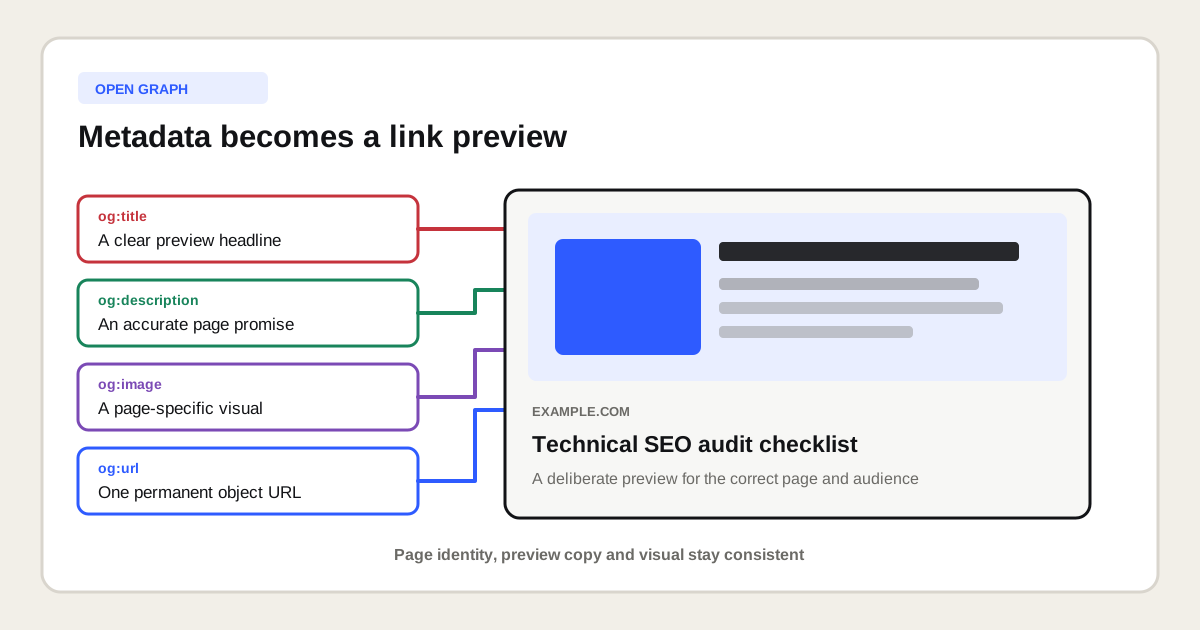
Open Graph means a page can describe itself as an object that other platforms can represent in a rich preview. The protocol was created at Facebook and places meta properties in the HTML head, where a crawler can read them without changing the main content visible to a visitor.
The central entity is the webpage. Open Graph connects that webpage with attributes such as its preview title, representative image, permanent object URL, description, content type, site name and locale. A platform can use those attributes when it builds a card for a shared link, although the final rendering remains under that platform's control.
Which Open Graph tags are required?
The official Open Graph Protocol identifies og:title, og:type,og:image and og:url as the four basic required properties. These tags establish what the object is called, what type of object it is, which image represents it and which URL acts as its permanent identifier.
| Property | Question it answers | Practical value |
|---|---|---|
og:title | What should the preview be called? | Creates the visible preview headline. |
og:type | What kind of object is this? | Distinguishes a website, article or another supported type. |
og:image | Which visual represents the page? | Provides the main preview image. |
og:url | Which URL identifies the object? | Consolidates shares around one permanent object URL. |
The specification also documents optional properties such as og:description,og:locale, og:locale:alternate and og:site_name. Image properties can define width, height, MIME type, a secure URL and alternative text. The official Open Graph Protocol specification is the primary source for this syntax.
What does a complete Open Graph example look like?
A complete Open Graph implementation places absolute, page-specific metadata in the document head. The following example identifies an article, gives it one stable URL and supplies an image with explicit dimensions and alternative text.
<meta property="og:title" content="Technical SEO audit checklist" />
<meta property="og:type" content="article" />
<meta property="og:url" content="https://example.com/technical-seo-audit" />
<meta property="og:image" content="https://example.com/images/technical-seo-audit.png" />
<meta property="og:image:width" content="1200" />
<meta property="og:image:height" content="630" />
<meta property="og:image:alt" content="Technical SEO audit workflow from crawl to action plan" />
<meta property="og:description" content="Audit crawling, indexing, templates and performance with a practical checklist." />
<meta property="og:site_name" content="Example Company" />
<meta property="og:locale" content="en_US" />
The preview title and description can be written for sharing, but they must still describe the visible page accurately. A promotional claim that the page cannot support creates a mismatch between the preview and the destination. Reuse the actual brand, subject and page promise instead of treating Open Graph as an isolated advertisement.
How is Open Graph different from other metadata?
Open Graph differs from other metadata because its main job is describing a shareable object to preview consumers. A title tag, meta description, canonical link, structured data and X Card metadata each communicate with a different purpose or system.
| Element | Primary purpose | Should it match Open Graph? |
|---|---|---|
| Title tag | Names the document for browsers and search results. | The topic should match, but wording can differ. |
| Meta description | Provides a possible search-result description. | The promise should match, but length and focus can differ. |
| Canonical link | Indicates a preferred URL to search engines. | It often matches og:url, but serves another system. |
| Schema.org markup | Describes entities, properties and relationships. | Facts should stay consistent across both layers. |
| X Card metadata | Provides card-specific fields for X. | It can reuse the same title, description and image. |
Read the separate explanations of the title tag, meta description and canonical tag before changing several metadata layers at once. The structured data guideexplains the entity layer in more detail.
Does Open Graph improve Google rankings?
Open Graph is not a documented requirement for ranking in Google Search. Its direct function is controlling or informing link previews, so it should not be sold as a hidden ranking factor or as a substitute for crawlable, useful page content.
The practical SEO relationship is indirect. A clear preview can make a shared page easier to recognize and more appealing to the right audience. That can support distribution, branded exposure and referral visits. Whether those outcomes occur depends on the page, platform, audience and message. Open Graph alone does not prove or guarantee an organic ranking improvement.
How should you choose an Open Graph image?
Choose an Open Graph image that explains or identifies the specific page at preview size. Use a stable public HTTPS URL, a supported raster format for the target platform, sufficient contrast, limited text and a focal point that remains understandable if the image is cropped.
A practical general default is a 1200 by 630 pixel landscape image. This is close to the common 1.91 to 1 preview ratio. LinkedIn currently documents 1200 by 627 pixels as its minimum recommendation for its sharing module, together with a 1.91 to 1 ratio. Its website sharing requirementsshould still be checked when LinkedIn is an important channel.
| Image decision | Recommended check | Failure to prevent |
|---|---|---|
| Subject | Represents this page, not only the company. | Every shared URL looks identical. |
| Dimensions | Uses a tested landscape ratio with enough resolution. | Thumbnail rendering or severe cropping. |
| File access | Loads publicly over HTTPS without login or blocked crawling. | The platform cannot fetch the image. |
| Image URL | Uses an absolute URL and changes deliberately after major revisions. | Old cached artwork persists. |
| Alternative text | Describes the actual image through og:image:alt. | The visual has no textual description. |
How do you implement Open Graph in Next.js?
Implement Open Graph in Next.js through the Metadata API at the relevant layout or page level. Shared defaults can live in a layout, but important pages should override the title, description, URL and image so every preview accurately represents its own destination.
export const metadata = {
  title: 'Technical SEO audit checklist',
  description: 'Audit crawling, indexing, templates and performance.',
  alternates: {
    canonical: 'https://example.com/technical-seo-audit',
  },
  openGraph: {
    type: 'article',
    url: 'https://example.com/technical-seo-audit',
    title: 'Technical SEO audit checklist',
    description: 'Audit crawling, indexing, templates and performance.',
    siteName: 'Example Company',
    locale: 'en_US',
    images: [{
      url: 'https://example.com/images/technical-seo-audit.png',
      width: 1200,
      height: 630,
      alt: 'Technical SEO audit workflow from crawl to action plan',
    }],
  },
};
Use generated metadata when a route depends on a product, article, location or database record. The resulting server-rendered HTML should contain the final meta elements without requiring a visitor to click, scroll or run client-side state changes. Verify the built HTML because a correct TypeScript object does not automatically prove that every absolute URL and inherited field is correct.
How do you implement Open Graph in WordPress?
Implement Open Graph in WordPress through one responsible metadata layer, usually a well maintained SEO plugin or a controlled theme integration. Configure defaults for the site, then provide page-specific titles, descriptions and images for important articles, services, products and landing pages.
Avoid enabling the same feature in several plugins. Duplicate og:title,og:url or og:image elements can create conflicting instructions. Inspect the final source after caching and optimization plugins have run. The browser source, not the plugin settings screen, is the evidence a crawler receives.
How do you test Open Graph tags?
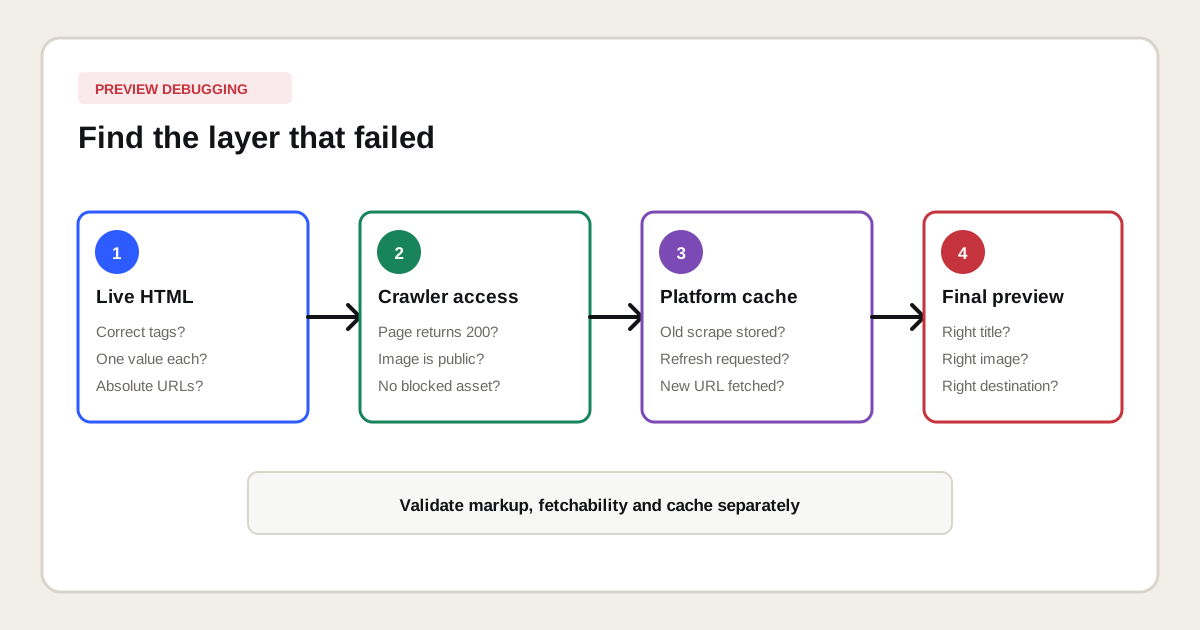
Test Open Graph tags by checking the live HTML, opening every referenced URL and then asking the relevant sharing platform to fetch the page. Separate markup validation from preview validation because valid tags can still point to an inaccessible image or stale cache.
- Open the final public URL and inspect the server-rendered document head.
- Confirm that each important Open Graph property appears once with the intended value.
- Open
og:urlandog:imagedirectly and verify their status codes. - Check image dimensions, format, file size and alternative text.
- Compare
og:urlwith the self-canonical and language version. - Use the debugger or post inspector of every priority sharing platform.
- Record the fetched result after requesting a refresh.
Why is an Open Graph preview wrong or outdated?
An Open Graph preview is usually wrong because the live metadata is missing, duplicated, inaccessible, inconsistent or cached. Start with the actual fetched source instead of repeatedly editing the visible page or uploading new images without identifying the layer that failed.
| Observed problem | Likely cause | First action |
|---|---|---|
| No image appears | Missing tag, blocked file, unsupported format or small image. | Open the image URL and inspect the response. |
| Old image appears | The platform still holds a cached preview. | Request a fresh scrape after checking the live tag. |
| Wrong title appears | Duplicate tags, fallback metadata or platform rewriting. | Find every title property in the final source. |
| Wrong URL appears | og:url, canonical and redirects disagree. | Map the full redirect and canonical chain. |
| One language appears everywhere | Localized routes inherit global metadata. | Generate metadata per language URL. |
How should Open Graph work on multilingual websites?
Each indexable language page should normally publish metadata in its own language and identify its own URL. Use the appropriate og:locale, add genuine alternate locales where useful and keep the preview aligned with the localized title, content, image and conversion path.
Do not let every language version inherit the English og:url or a Dutch description. That breaks the relationship between page, language and preview. The multilingual SEO guide explains how canonicals, hreflang, localized intent and market-specific evidence work together across the wider site.
Which Open Graph mistakes matter most?
The most important Open Graph mistakes are contradictions between the page identity, preview copy, destination URL and representative image. These errors scale quickly when a template, CMS field or global layout supplies the wrong value to many URLs.
- Using one generic image and description for every page.
- Publishing relative image URLs instead of absolute public URLs.
- Pointing
og:urlto another language, staging host or tracking URL. - Generating several conflicting tags through plugins and theme code.
- Using an image that becomes unreadable when cropped or reduced.
- Omitting
og:image:altwhen an Open Graph image is supplied. - Assuming a platform must display every provided value exactly.
- Calling Open Graph structured data or a direct Google ranking factor.
What should an Open Graph audit deliver?
An Open Graph audit should deliver a page-template inventory, conflict report, image check, URL consistency check and prioritized correction list. It should cover representative URLs from each template instead of testing only the homepage.
| Audit layer | Evidence | Decision |
|---|---|---|
| Coverage | Sample URLs per page type | Which templates need their own metadata rules? |
| Uniqueness | Titles, descriptions and image URLs | Which pages reuse an unsuitable default? |
| Consistency | Open Graph, canonical, locale and redirects | Which identity conflicts must be fixed first? |
| Fetchability | Status codes, headers and image access | Can external crawlers retrieve every required asset? |
| Rendering | Platform preview screenshots | Does the final result communicate the page clearly? |
Open Graph belongs in a broader technical SEO auditwhen metadata is duplicated, generated incorrectly or connected to the wrong canonical URLs. It belongs in an on-page SEO review when the preview message does not match the page intent or its visible promise.
Which primary sources support this Open Graph guide?
The factual protocol definitions and properties on this page are based on the official Open Graph Protocol. The platform-specific LinkedIn image and sharing guidance comes from LinkedIn Help. Platform interfaces and requirements can change, so implementation should always be tested against the current documentation and the live preview tool for each priority channel.