
What is Businesses in ChatGPT?
Businesses in ChatGPT is an OpenAI feature that lets a company claim its profile in ChatGPT, manage its details and see how often ChatGPT points people to its website. It comes in three parts.
| Part | What it does |
|---|---|
| Business Hub | Where you manage everything: claim the business, edit the profile, connect a product feed. It sits in the ChatGPT sidebar. |
| Insights | Mentions, clicks to your website and the topics of conversations where your site was cited. |
| Business Agents | A chat that speaks for your business and answers customer questions from your own information. |
It does for ChatGPT roughly what Search Console does for Google, with one big difference: you never see prompts or conversations. For how ChatGPT picks and recommends businesses in the first place, see ChatGPT visibility.
Who can claim a business?
You can claim a profile in any country where ChatGPT is available, as long as you own the business or are authorized to represent it, and it has a website. You do not need an ads account or an Enterprise contract. OpenAI can turn businesses down, and some categories are on hold.
| What | Where and for whom, at launch |
|---|---|
| Claim an existing profile | Any country where ChatGPT is available, for eligible businesses with a website |
| Add a new profile | Online businesses such as stores and apps. The option for service businesses was marked coming soon. |
| Local stores and restaurants | Claim an existing listing only, US only |
| Business Agents | Ecommerce and online service businesses in the US only |
| Product feed | Built for the US; other markets need OpenAI to confirm the integration first |
How do you claim your business in ChatGPT?
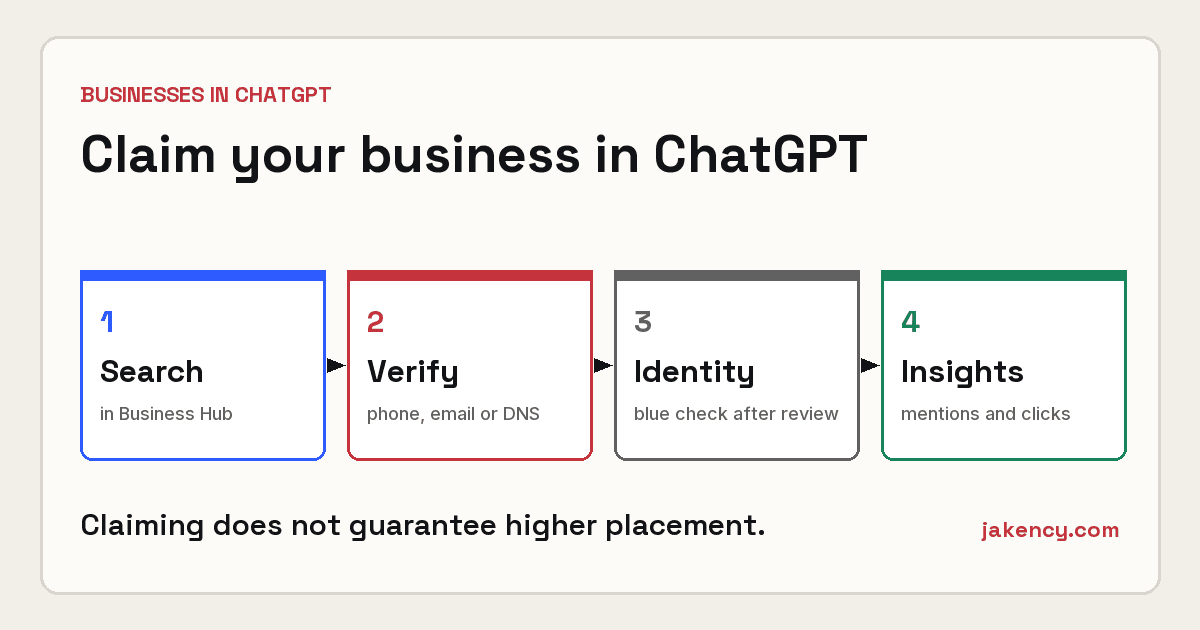
You claim it in Business Hub, in five steps. The decision arrives by email.
- Sign in to ChatGPT and open Business Hub.
- Search for your business by name.
- Pick the matching profile and confirm which ChatGPT account will manage it.
- Choose a verification method: a code to the business phone, a code to the business email, a DNS record on your domain, or connecting your Shopify store. You only see the methods that apply to you.
- Wait for OpenAI’s review.
Approval is followed by an identity check. You may be asked for a government ID, your company registration details and proof that you can act for the business. The name, address and registration number have to match official records. Only after that do you get the blue check, publish edits and see insights.
| Stage | What it unlocks |
|---|---|
| Claim approved | The business shows up in your Business Hub |
| Identity approved | Blue check, publishing edits, product feed, insights |
| Agent published | Customers can chat with your business |
You can then edit your website, description, category, logo, cover photo and your delivery and return policies. OpenAI reviews every change before it goes live.
How do you verify with a DNS record?
You verify with a TXT record that ChatGPT generates for you and that you add to your domain’s DNS. It is the same kind of check Google Search Console uses.
- Copy the TXT record ChatGPT shows you.
- Open the DNS settings at your registrar or host and add the record.
- Select Verify domain in Business Hub.
- Give it time. A new DNS record is not visible everywhere right away.
If you are not sure where your DNS lives, ask whoever manages your website or domain. Leave the record in place for as long as you manage the profile.
What do the insights show?
Insights cover the past 28 days. There are three numbers, and the definitions matter.
| Metric | What it means |
|---|---|
| Mentions | For an online business: how often ChatGPT referenced your website. Your brand name on its own does not count. For a local business: how often ChatGPT showed a result for your location. |
| Website clicks | Clicks on links to your site inside ChatGPT. A click does not confirm a visit or a conversion. |
| Discovery topics | Grouped themes from conversations where your website was cited. Individual questions are not shown. |
Numbers only appear once activity passes a reporting threshold, so a blank is not a zero. If you want to see ChatGPT traffic today, ChatGPT adds utm_source=chatgpt.com to its links, which you can filter on in your own analytics.
What are Business Agents?
A Business Agent is a chat that speaks for your business and answers questions from your own product and policy information. Customers open it themselves from your profile, and it runs separately from their regular ChatGPT conversation. At launch it is limited to eligible ecommerce and online service businesses in the US.
The agent has to say it is an AI. It cannot invent prices, stock or reviews, create false urgency, or ask for health details, government IDs or payment information. Orders and bookings still happen on your own website. An agent can also be the destination for ads in ChatGPT, covered in ChatGPT Ads in Europe.
What does this mean for a local business?
An online store or online service can claim today. A local service business, say a plumber, a contractor or a law firm, has fewer options at launch. That is no reason to sit still, because ChatGPT shows information about businesses whether they claimed a profile or not.
- Look your business up in Business Hub. If it is there, check what ChatGPT says about you.
- Online store or online service? Claim now, using DNS if you are not on Shopify.
- Local service business? Make sure your website says clearly what you do, where and for whom, so ChatGPT describes you correctly. Test your own buying questions to see whether you get named.
- Track ChatGPT traffic today with
utm_source=chatgpt.comin your analytics.
For how ChatGPT and Google differ in what they show, read ChatGPT vs Google search.
What do people get wrong about Business Hub?
| Misconception | What is true |
|---|---|
| It shows how often you appear, like impressions in Google | It shows mentions, clicks and topics. For an online business a mention only counts when ChatGPT links to your site. |
| Claiming your business moves you up in ChatGPT | OpenAI says claiming does not guarantee higher placement or sales. |
| A click in the insights is a visitor | A click does not confirm a visit or a conversion. Check your own analytics. |
| It is only for US businesses | You can claim in any country where ChatGPT is available. Only Business Agents and local listings are US-only at launch. |
| Once claimed, you can edit everything right away | An identity check comes first. Only then can you publish edits and see insights. |
| You can see what people asked | OpenAI does not share prompts or conversations, including chats with your agent. |
What else should you know about Business Hub?
Does it cost anything to claim your business in ChatGPT?
OpenAI lists no fee for claiming a profile. ChatGPT Ads is a separate paid product. Claiming, publishing a Business Agent and advertising are independent of each other.
Can I claim my business outside the US?
Yes, in any country where ChatGPT is available, for eligible businesses with a website. At launch, local stores and restaurants could only claim an existing listing in the US, and the option for service businesses was marked coming soon.
Will claiming my business improve my ranking in ChatGPT?
No. OpenAI says plainly that claiming does not guarantee higher placement or sales. ChatGPT keeps making its own recommendations, including about businesses that never claimed a profile.
What data does Business Hub show?
For the past 28 days: mentions, clicks to your website and discovery topics, the themes of conversations where your site was cited. You do not see prompts or conversations, and numbers only appear above a reporting threshold.
How do I verify my business with DNS?
Copy the TXT record ChatGPT shows you, add it to your domain’s DNS settings and select Verify domain. The record can take a while to propagate. An identity check follows after that.
What is a Business Agent?
A chat that speaks for your business and answers questions from your own product and policy information. It runs separately from the customer’s own ChatGPT conversation. At launch it is only open to eligible ecommerce and online service businesses in the US.